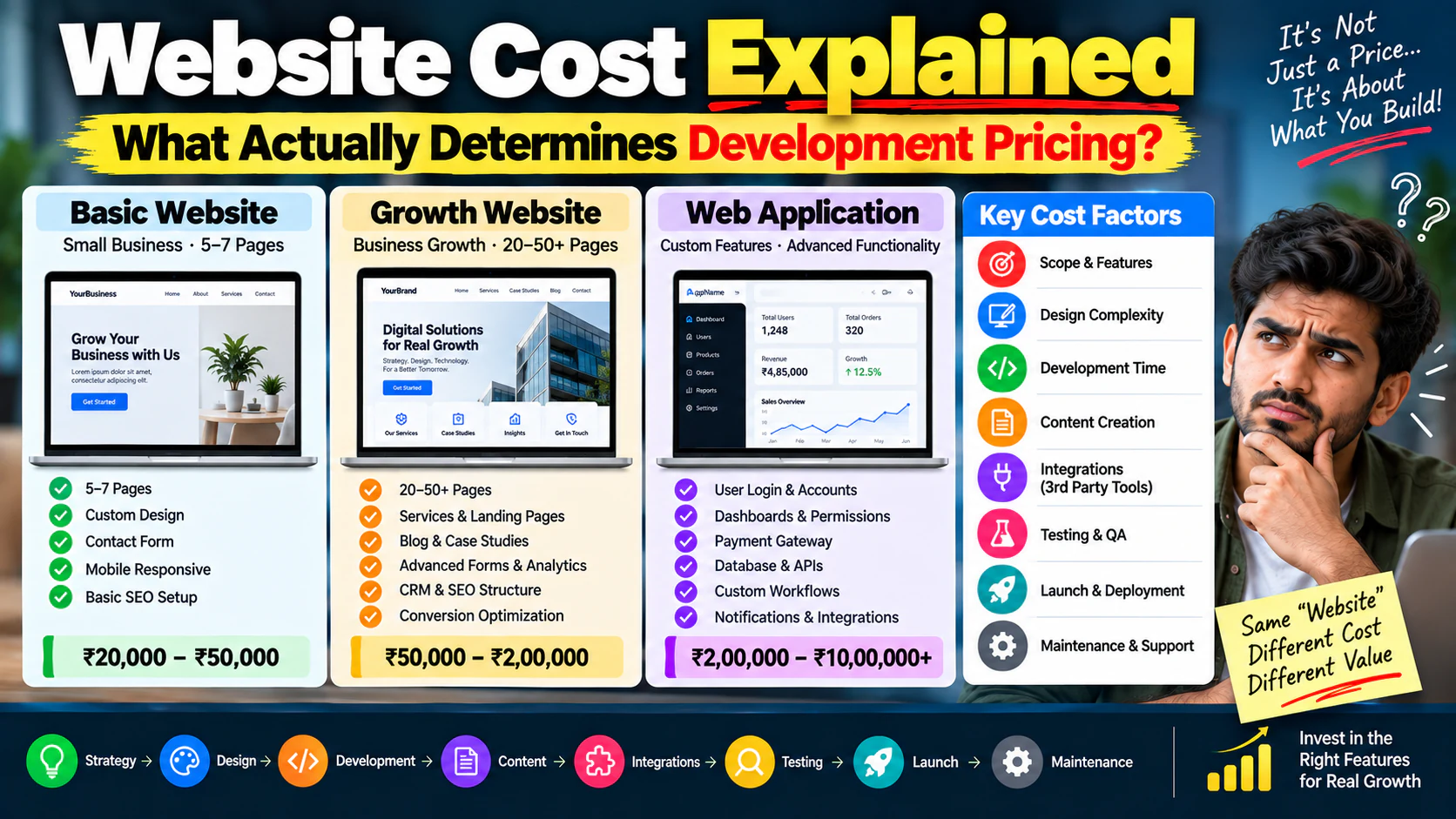
“How much does a website cost?”
It sounds like a simple question.
But a professional answer cannot be:
Because a website is not a fixed product like a laptop or a chair.
The cost depends on what you're actually building.
A five-page brochure website and a 50-page lead-generation website may both be called “business websites,” but they can have completely different requirements.
And a website with:
- Customer login
- Payment gateway
- CRM integration
- Product catalogue
- Booking system
- Custom dashboard
- Advanced search
- Multiple user roles
is effectively a completely different project.
So instead of asking:
“What is the price of a website?”
the better question is:
“What factors are driving the cost of this website, and which of them actually matter for my business?”
This guide breaks down exactly that.
Website Cost Is Really the Cost of Scope
The easiest way to understand website pricing is:
Not every project needs every component at the same level.
For example:
Basic business website
- 5–7 pages
- Custom design
- Contact form
- Mobile responsive
- Basic SEO setup
This has a relatively controlled scope.
Growth website
- 20–50+ pages
- Service architecture
- Blog
- Case studies
- Landing pages
- Advanced forms
- Analytics
- CRM
- SEO structure
- Conversion optimization
Now the scope is much larger.
Web application
- Login
- User accounts
- Dashboards
- Payments
- Permissions
- Workflows
- APIs
- Database
- Notifications
This is no longer just a website project.
It's an application project.
The First Factor: What Type of Website Are You Building?
This is usually the biggest cost driver.
Business Website
Typical requirements:
- Home
- About
- Services
- Industries
- Portfolio
- Contact
- Blog
Usually simpler.
Lead Generation Website
Adds:
- Dedicated service pages
- Industry pages
- Landing pages
- Lead forms
- CRM integration
- Conversion tracking
- Conversion-focused UX
More planning and development are required.
E-commerce Website
Adds:
- Products
- Categories
- Product filters
- Cart
- Checkout
- Payments
- Inventory
- Order management
- Customer accounts
The complexity increases quickly.
Web Application
Adds:
- Authentication
- User roles
- Databases
- Dashboards
- Business logic
- APIs
- Notifications
- Complex workflows
This should be priced and planned as software, not simply as a website.
Number of Pages Matters—But Page Count Isn't Everything
A common pricing question is:
“How much for 10 pages?”
But 10 pages can mean very different things.
Example A
10 simple informational pages.
Example B
10 highly customized landing pages with:
- Unique layouts
- Interactive elements
- Forms
- Tracking
- Animations
- Conversion sections
Same page count.
Very different workload.
That's why good website pricing shouldn't be based only on:
Website Design Can Change the Budget Dramatically
There is a major difference between:
Template-based design
and
Fully custom UI/UX.
A template can provide:
- Existing layouts
- Design patterns
- Components
- Responsive structures
This can reduce design and development time.
A custom website may require:
- Wireframes
- User flows
- Design system
- Custom components
- Desktop layouts
- Mobile layouts
- Interactive states
- Multiple revisions
The more unique the experience, the more design work is involved.
Don't Confuse “Custom Design” With “Custom Development”
This is important.
You can have:
You can also have:
And you can have:
These are separate decisions.
That's why platform selection should happen after requirements are understood.
If you're still deciding between WordPress and custom development, first evaluate the trade-offs rather than assuming one is automatically better.
UX Research Adds Cost—But Can Prevent Expensive Mistakes
A professional website shouldn't only ask:
“What should it look like?”
It should ask:
“What should the user do?”
For example:
A service website may want visitors to:
An e-commerce site may want:
A SaaS website may want:
The more carefully these journeys are designed, the more strategic work happens before development.
Many website budgets exclude content.
Then the business discovers:
“We need 30 service pages written.”
That changes the project.
Content may include:
- Website copy
- Service descriptions
- Product descriptions
- FAQs
- Case studies
- Blog content
- Images
- Videos
- Downloadable resources
If the agency is responsible for creating this content, it should be included in the scope.
Who Is Providing the Content?
Ask this before signing.
Option 1: Client provides everything
Lower agency workload.
Option 2: Agency edits existing content
Moderate workload.
Option 3: Agency creates everything
Higher workload.
Option 4: Agency creates SEO-driven content architecture
Now you're adding strategic SEO work as well.
These are different deliverables.
Photography and Video Can Change the Cost
A website may require:
- Product photography
- Office photography
- Team photographs
- Brand videos
- Product demonstrations
- Motion graphics
These are often outside standard development.
If visual assets need professional production, budget for them separately.
SEO Should Be Considered Before Development
Adding SEO after the website is built can create unnecessary rework.
SEO considerations include:
- URL structure
- Navigation
- Page hierarchy
- Content architecture
- Internal linking
- Metadata
- Schema
- Indexability
- Canonicals
- Redirects
- Sitemap
- Performance
For an SEO-driven website, these should be considered during architecture and development.
Not as an afterthought.
Website Architecture Can Affect Development Cost
Consider two websites.
Website A
Home → Services → Contact
Website B
Home
Website B needs a much more carefully planned information architecture.
The development isn't just “more pages.”
It's a more sophisticated content system.
Functionality Is Usually a Bigger Cost Driver Than Design
A beautiful page can be relatively straightforward to build.
But consider:
“When the customer submits this form, check the selected service, calculate the estimated price, send the lead to the CRM, assign the sales representative, trigger an email and display a customized confirmation.”
Now you're building logic.
That's where development effort can increase significantly.
Forms: Simple vs Advanced
Simple contact form
- Name
- Phone
- Message
Relatively simple.
Advanced lead form
- Multiple steps
- Conditional questions
- File uploads
- Service selection
- Location selection
- Qualification scoring
- CRM integration
- Automated notifications
Much more complex.
The word “form” doesn't tell you the actual development scope.
CRM Integration Can Add Significant Complexity
Suppose the website connects to a CRM.
The requirement might be:
Now the website is part of a larger business system.
Integration requirements should be specified before development begins.
Payment Gateway Integration
An online payment requirement can involve:
- Payment provider setup
- Checkout
- Success/failure states
- Webhooks
- Order confirmation
- Refund handling
- Transaction records
- Security
- Email notifications
“Payment integration” is therefore not always one simple task.
Third-Party APIs
Your website may connect to:
- CRM
- ERP
- Inventory
- Accounting software
- Shipping
- Payment gateway
- Booking software
- Email platform
- SMS provider
- WhatsApp services
- Analytics systems
Each integration needs to be evaluated.
Ask:
- Is an API available?
- What data needs to move?
- In which direction?
- How often?
- What happens if the API fails?
- Who maintains the integration?
User Login Changes the Project
A public website is simple:
A logged-in platform is different:
Now you need to consider:
- Registration
- Login
- Password reset
- Verification
- Sessions
- User roles
- Permissions
- Account management
- Security
This is a major scope change.
User Roles Add More Complexity
Suppose a system has:
Admin
Can see everything.
Manager
Can see team information.
Employee
Can see assigned tasks.
Customer
Can see only their own records.
Each role may need different:
- Pages
- Permissions
- Actions
- Data
- Notifications
That's application-level complexity.
Search and Filtering Can Be More Complex Than It Looks
A simple website search is one thing.
A marketplace may require:
That's a completely different feature.
Always define what “search” means before pricing it.
E-commerce Has Multiple Cost Layers
An e-commerce project may require:
Product system
- Products
- Variants
- Categories
- Attributes
Shopping experience
- Search
- Filters
- Product pages
- Cart
Checkout
- Address
- Shipping
- Payment
- Order confirmation
Operations
- Inventory
- Orders
- Refunds
- Customers
Marketing
- Coupons
- Promotions
- Analytics
- Abandoned cart
A serious e-commerce project is much more than “add products to a website.”
Multilingual Websites Increase Scope
A multilingual website may require:
- Translation
- Language switcher
- Separate URLs
- SEO handling
- Content management
- RTL support where relevant
- Testing
If you need:
for example, you need to decide whether translations are:
- Client-provided
- Agency-provided
- Machine-generated
- Professionally translated
This affects both content and development scope.
Location-Based Websites Add More Complexity
Suppose you want:
for:
- Ahmedabad
- Surat
- Vadodara
- Mumbai
- Delhi
If these are manually created pages, that's content work.
If the system dynamically generates location pages based on data, that's development work.
Again, the requirement matters.
Animations and Interactions
Animations can make a website feel premium.
But they can also increase:
- Design time
- Development time
- Testing
- Performance optimization
- Mobile complexity
Examples:
- Scroll animations
- Interactive product demos
- Animated navigation
- 3D elements
- Micro-interactions
- Video backgrounds
Use animation where it improves the experience.
Don't add complexity simply because it looks impressive in a design mockup.
Mobile Design Is Not Optional
A website isn't finished because the desktop version looks good.
You need to consider:
- Mobile navigation
- Responsive typography
- Forms
- Buttons
- Images
- Tables
- Cards
- Checkout
- Popups
- Interactive elements
A complex desktop interaction may need a completely different mobile solution.
That increases design and testing effort.
Browser and Device Testing
Professional development should include testing across relevant environments.
Examples:
- Chrome
- Safari
- Edge
- Firefox
- Android
- iPhone
- Tablet
The exact testing matrix depends on the project.
But testing should be part of the scope—not something discovered at the end.
Performance Optimization Has a Cost
Performance work can include:
- Image optimization
- Caching
- Script optimization
- CSS optimization
- Font optimization
- Lazy loading
- CDN configuration
- Database optimization
- Server optimization
If performance is a business priority, budget for it intentionally.
Don't expect:
“Fast website”
to happen automatically.
Core Web Vitals Can Affect the Build
If the website needs strong real-world performance, architecture matters.
You may need to evaluate:
- Largest Contentful Paint
- Interaction to Next Paint
- Cumulative Layout Shift
- JavaScript execution
- Image delivery
- Server response
A performance-focused website requires decisions during development, not just a speed test after launch.
Hosting Is Not Included in “Website Development” Automatically
Ask:
“Where will the website be hosted?”
Possible requirements vary:
- Shared hosting
- Managed hosting
- Cloud infrastructure
- Dedicated server
- CDN
- Database server
- Object storage
A small website may need very little infrastructure.
A high-traffic application may require much more.
Domain and SSL Are Separate Considerations
You may also need:
- Domain registration
- DNS management
- SSL
- Email hosting
- CDN
- Security services
These can be recurring costs.
Make sure you know what is included in the agency quote.
Maintenance Is a Real Cost
A website isn't finished forever when it goes live.
You may need:
- Updates
- Security patches
- Backups
- Monitoring
- Bug fixes
- Content updates
- Plugin updates
- Performance checks
For custom applications:
- Code maintenance
- Dependency updates
- Server maintenance
- Security patches
- API maintenance
The maintenance model should be discussed before launch.
WordPress Maintenance Can Include More Than Hosting
For a WordPress website, ongoing work may include:
- WordPress updates
- Theme updates
- Plugin updates
- Compatibility testing
- Backups
- Security monitoring
- Performance monitoring
If multiple third-party plugins are used, maintenance requirements can increase.
This is one reason platform and development choices should be evaluated together with long-term ownership.
Custom Development Has Its Own Maintenance Cost
A custom application may require:
- Developer availability
- Server management
- Code updates
- Dependency updates
- Bug fixing
- Database maintenance
- Security monitoring
The advantage is greater control.
The trade-off is greater engineering responsibility.
Website Ownership Can Affect the Real Cost
Before signing a contract, clarify:
Who owns the domain?
You should know.
Who owns the hosting account?
You should know.
Who owns the source code?
Important for custom development.
Who owns the design files?
Clarify.
Who owns the content?
Clarify.
Who owns third-party licenses?
Clarify.
A cheap website can become expensive if you're locked into the vendor later.
Beware of Vendor Lock-In
Imagine you spend:
on a website.
But the agency says:
“You can only host it with us.”
or:
“You can't access the source code.”
or:
“Only our team can update the system.”
Now switching providers can become expensive.
Always ask about portability before development starts.
Revisions Can Increase Cost
A project may include:
That's different from:
If requirements change repeatedly, development time increases.
Define:
- Number of revisions
- Approval process
- Change requests
- Out-of-scope work
- Additional hourly/day rates
before the project begins.
Scope Creep Is One of the Biggest Pricing Problems
It starts with:
“Just one small change.”
Then:
“Can we add a calculator?”
Then:
“Can users log in?”
Then:
“Can we connect the CRM?”
Then:
“Can we add a dashboard?”
Each individual request sounds small.
Together, they can completely change the project.
That's why a proper requirements document matters.
A Good Website Quote Should Show the Scope
Instead of:
Website Development — ₹2,50,000
ask for a breakdown.
For example:
| Component | Scope |
|---|---|
| Strategy | Requirements + architecture |
| UX/UI | Wireframes + design |
| Development | Frontend + CMS |
| Content | X pages |
| SEO | Technical foundation |
| Integrations | CRM + forms |
| Testing | Responsive + functional |
| Launch | Deployment |
| Training | CMS handover |
| Support | X months |
Now you can compare proposals properly.
Never Compare Two Quotes by Price Alone
Suppose:
Agency A
₹1,50,000
Includes:
- 5 pages
- Template
- Basic form
- Basic setup
Agency B
₹3,00,000
Includes:
- UX strategy
- Custom design
- 20 pages
- SEO architecture
- CRM integration
- Analytics
- Conversion tracking
- Testing
- Training
Agency B isn't necessarily “twice as expensive.”
It may simply be delivering twice the scope—or a completely different quality of work.
Ask What Is Not Included
This is one of the best questions you can ask.
Ask:
“What isn't included in this quotation?”
Potential exclusions:
- Content
- SEO
- Hosting
- Domain
- Premium plugins
- Photography
- Copywriting
- CRM integration
- Analytics
- Maintenance
- Additional pages
- Revisions
- Migration
Hidden exclusions are where budgets often expand.
Website Development Cost Should Be Evaluated Over 3 Years
Don't look only at:
Look at:
For example:
Option A
Initial build: ₹2,00,000
Annual maintenance: ₹40,000
Three-year base cost:
Option B
Initial build: ₹5,00,000
Annual maintenance: ₹80,000
Three-year base cost:
But if Option B generates substantially more leads or saves operational costs, it could still produce a better return.
The cheapest system isn't always the cheapest business decision.
Think About Website ROI
Suppose your website generates:
and your average customer value is:
If even:
of qualified leads become customers:
100 × 5% \= 5 customers
5 × ₹50,000 \=
Now the website shouldn't be evaluated purely as a design expense.
It's a revenue asset.
The Real Question: What Is One New Customer Worth?
Before setting a website budget, understand:
- Average order value
- Customer lifetime value
- Lead-to-customer rate
- Gross margin
- Sales cycle
- Number of leads required
- Current conversion rate
For a high-value B2B business, one additional customer could justify a significant website investment.
For a low-ticket business, the economics may be completely different.
A Website Can Be Cheap and Still Be Expensive
Suppose you pay:
for a website.
But it produces:
- Poor SEO structure
- Weak messaging
- Bad mobile UX
- No conversion tracking
- Slow pages
- No CRM integration
- Poor lead quality
Then you may spend another:
fixing the problems later.
The original ₹40,000 wasn't necessarily cheap.
It may have been deferred cost.
A More Expensive Website Can Also Be a Bad Investment
The opposite is equally true.
Suppose someone sells you:
with:
- Complex animations
- Advanced technology
- Custom architecture
- Beautiful visuals
But your business only needed:
- 10 service pages
- Blog
- Lead forms
- SEO
- Analytics
The extra complexity may not generate additional business value.
Expensive doesn't automatically mean better.
What Should a Business Website Budget Actually Cover?
At minimum, evaluate these categories:
Strategy
- Business objectives
- Audience
- Positioning
- Conversion goals
Architecture
- Sitemap
- Navigation
- Page hierarchy
- Content structure
Design
- UX
- UI
- Responsive layouts
Development
- Frontend
- CMS
- Functionality
- Integrations
Content
- Copy
- Images
- Case studies
- FAQs
SEO
- Technical setup
- URLs
- Metadata
- Indexability
Analytics
- GA4
- GTM
- Conversion tracking
Testing
- Functional
- Mobile
- Browser
- Performance
Launch
- Hosting
- DNS
- SSL
- Deployment
Handover
- Training
- Documentation
- Access
Maintenance
- Updates
- Security
- Backups
- Support
Website Pricing Questions to Ask Before Hiring a Developer
Use this checklist.
Scope
- How many pages are included?
- Are landing pages included?
- Are future pages easy to create?
- What functionality is included?
Design
- Is the design custom?
- How many revision rounds?
- Are mobile layouts included?
- Are design files provided?
Development
- Which platform will be used?
- Why was that platform selected?
- What is custom-built?
- What third-party tools are being used?
SEO
- Is technical SEO included?
- Who handles URL structure?
- Are redirects included?
- Is the site built with SEO-friendly architecture?
Analytics
- Is GA4 included?
- Is GTM included?
- Are form submissions tracked?
- Are conversion events configured?
Integrations
- Is CRM integration included?
- Is payment integration included?
- Are APIs included?
- What happens if an external service changes?
Ownership
- Who owns the domain?
- Who owns the hosting?
- Who owns the source code?
- Who owns the design files?
Maintenance
- What support is included?
- What happens after the warranty period?
A Practical Website Cost Formula
Instead of thinking:
think:
This gives you a much more realistic understanding of website project cost.
Website Cost by Complexity
A useful conceptual framework is:
Level 1 — Basic Website
Typical characteristics:
- Few pages
- Standard functionality
- Basic forms
- Simple content
- Limited integrations
Level 2 — Growth Website
Typical characteristics:
- More pages
- Custom UX
- SEO architecture
- Landing pages
- CRM
- Analytics
- Conversion optimization
Level 3 — Advanced Website
Typical characteristics:
- Complex integrations
- E-commerce
- Advanced workflows
- User accounts
- Dynamic content
- Custom functionality
Level 4 — Web Application
Typical characteristics:
- Authentication
- Dashboards
- Database
- Complex business logic
- Multiple roles
- APIs
- Advanced workflows
The further you move down this list, the less useful a generic “website price” becomes.
How to Reduce Website Cost Without Destroying Quality
Reducing cost doesn't always mean removing important features.
Instead:
Prioritize features
Classify them as:
Build the must-haves first.
Use Existing Technology Where It Makes Sense
Don't custom-build something that already works perfectly through a reliable solution.
For example:
If you need a standard contact form, don't build an entire form engine.
If you need standard payment processing, don't create a payment system from scratch.
Custom development should be used where customization creates actual business value.
Build in Phases
Instead of building everything at once:
Phase 1
Launch the core website.
Phase 2
Add advanced landing pages.
Phase 3
Add automation.
Phase 4
Add customer portal.
Phase 5
Add advanced personalization.
This reduces initial risk.
But make sure the architecture allows the future phases where they genuinely matter.
Don't Cut the Foundation
When reducing cost, avoid cutting:
- Mobile responsiveness
- Security
- Backups
- Analytics
- SEO fundamentals
- Performance
- Accessibility
- Ownership
- Documentation
These are foundational.
Remove unnecessary complexity before removing foundational quality.
Where You Should Spend More
If budget is limited, prioritize areas that directly affect business performance.
For a lead-generation business:
Spend more on:
- Messaging
- UX
- Service pages
- Landing pages
- Forms
- Tracking
- SEO
- Conversion optimization
For e-commerce:
Spend more on:
- Product UX
- Search
- Filters
- Checkout
- Performance
- Analytics
For SaaS:
Spend more on:
- Product UX
- Authentication
- Architecture
- Performance
- Security
- Scalability
Your budget should follow the business model.
Don't Spend the Same Budget on Every Website
A local service company doesn't need the same architecture as:
- A national marketplace
- A SaaS company
- A large e-commerce brand
- A financial platform
The requirements are different.
So the investment should be different.
Your Website Requirements Document Should Come First
Before requesting quotes, document:
Business goal
What should the website achieve?
Audience
Who will use it?
Pages
What pages are required?
Features
What should users be able to do?
Integrations
What systems need to connect?
Content
Who creates it?
SEO
What needs to be built into the architecture?
Analytics
What needs to be measured?
Ownership
Who controls the assets?
Maintenance
Who will support it?
This makes vendor proposals much easier to compare.
Your Requirements Determine Your Platform
This is why website cost and platform decisions are connected.
If your requirements are primarily:
a CMS may be suitable.
If your requirements are primarily:
custom development may make more sense.
If you need both:
may be appropriate.
Start with requirements, not technology.
A Simple Website Budget Decision Framework
Before approving a proposal, answer:
Question 1
What business problem is this website solving?
Question 2
What must the website accomplish?
Question 3
What functionality is genuinely necessary?
Question 4
What can be postponed?
Question 5
Who will manage it?
Question 6
What will it cost over three years?
Question 7
Can another developer or agency take over?
Question 8
How will we measure whether the website succeeded?
If you can't answer these, you're not ready to compare quotes.
The Biggest Website Pricing Mistake
The biggest mistake isn't necessarily paying too much.
It's paying for the wrong scope.
A business can waste money by:
- Overbuilding
- Underbuilding
- Choosing the wrong platform
- Ignoring SEO
- Ignoring content
- Ignoring tracking
- Ignoring maintenance
- Ignoring ownership
The best project is not the cheapest.
It's the one where the investment matches the business requirement.