A service website has one job that a brochure does not:
Yet many service websites are structured around the company instead of the customer.
You see navigation like:
Home | About Us | Services | Our Team | Blog | Contact
Then the Services page contains 15 different services, each explained in two paragraphs.
The website may look professional.
It may even rank for some keywords.
But the visitor still has to figure out:
- Which service is right for me?
- Does this company solve my specific problem?
- Can they handle a business like mine?
- What results can I expect?
- Why should I trust them?
- What should I do next?
That is an architecture problem, not simply a design problem.
A strong service website structure connects:
This guide shows how to build that structure from the ground up.
What Is a Service Website Structure?
A service website structure is the way your:
- Services
- Sub-services
- Industry pages
- Location pages
- Case studies
- Resources
- About pages
- Contact pages
- Landing pages
are organized and connected.
Think of it as the commercial architecture of your website.
For example:
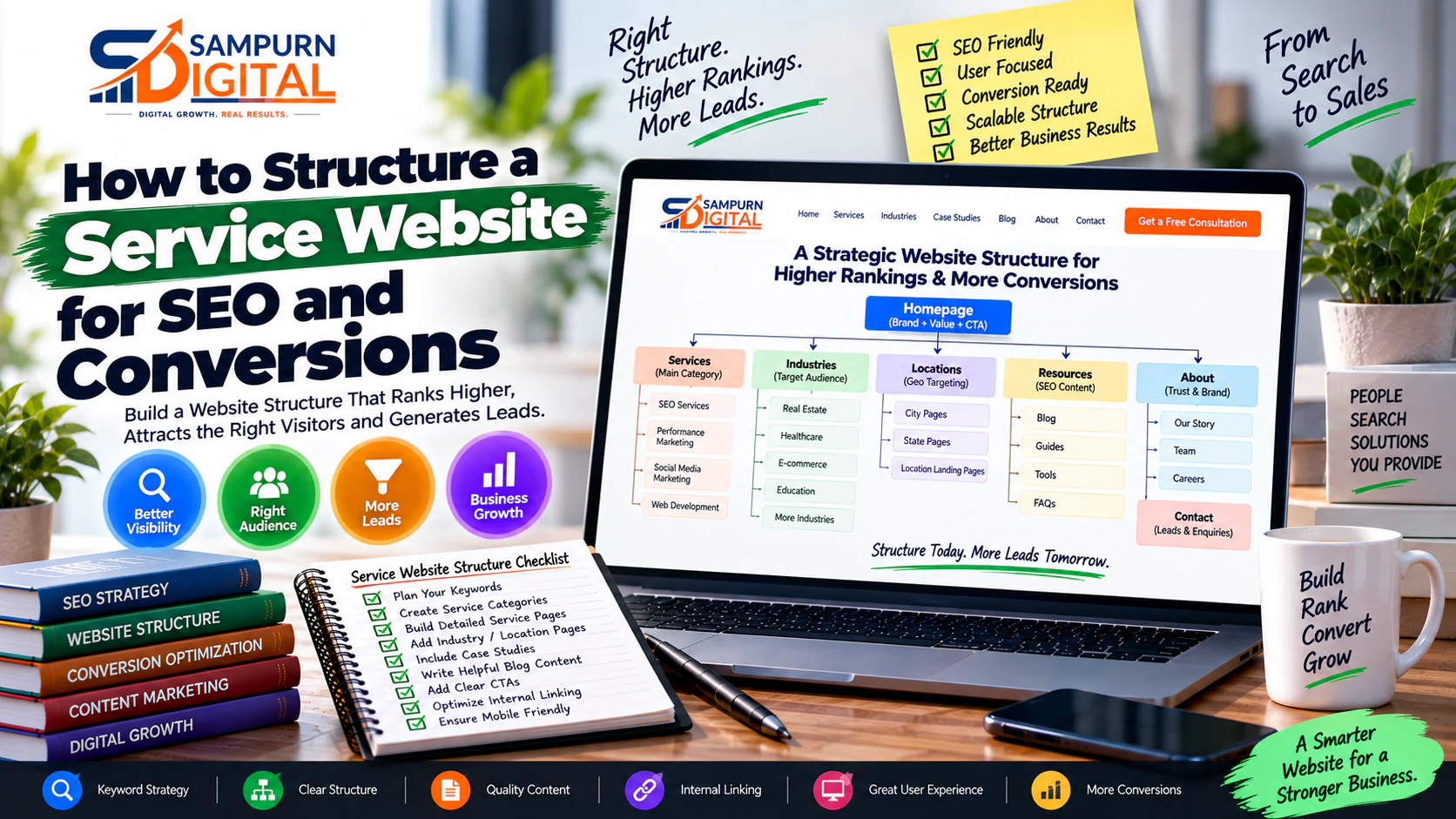
Homepage │ ├── Services │ ├── SEO Services │ ├── Performance Marketing │ ├── Social Media Marketing │ └── Web Development │ ├── Industries │ ├── Real Estate │ ├── Healthcare │ └── E-commerce │ ├── Case Studies │ ├── Resources │ ├── Blog │ ├── Guides │ └── Tools │ ├── About └── Contact
But a good architecture goes deeper.
Each important service page should connect to:
- Supporting content
- Relevant proof
- Related services
- FAQs
- Conversion points
- Other pages in the customer journey
The result is not just a website hierarchy.
It is a lead-generation system.
Why Service Website Architecture Matters
A poorly structured service website creates three major problems.
Problem 1: SEO becomes fragmented
You may have multiple pages targeting similar phrases.
For example:
- SEO agency
- SEO company
- SEO services
- SEO marketing services
- SEO experts
If every variation gets its own page without a meaningful difference in intent, you can create unnecessary overlap.
Problem 2: Users cannot find the right service
Imagine someone needs Google Ads management.
They land on your homepage.
They click Services.
They see:
- SEO
- Branding
- Website Design
- Social Media
- Content
- PPC
- Consulting
- Influencer Marketing
- Video Production
Now the user has to search through your navigation.
The architecture is making the visitor work.
Problem 3: Conversion paths become disconnected
Someone reads a useful article but has no obvious next step.
Someone views a service but cannot find proof.
Someone reaches a case study but cannot easily contact the company.
Every page exists, but the pages don't work together.
That's the difference between a website with pages and a website with a customer journey.
The Ideal Service Website Architecture
For many service businesses, a useful starting framework is:
               HOMEPAGE
                    │
    ┌───────────────┼────────────────┐
    ↓               ↓                ↓
 SERVICES       INDUSTRIES       RESULTS
    │               │                │
    ↓               ↓                ↓
Service Pages Industry Pages Case Studies │ ↓ Supporting Resources │ ↓ Consultation / Enquiry
Then connect everything through internal links.
For example:
Blog Article ↓ Service Page ↓ Case Study ↓ Contact
Industry Page ↓ Relevant Service ↓ Relevant Case Study ↓ Consultation
This gives users multiple ways to enter and continue through the website.
Start With Your Business Model
Before creating pages, list exactly what you sell.
Suppose your company offers:
Primary services
- SEO
- Google Ads
- Social Media Marketing
- Website Development
Specialized services
SEO:
- Technical SEO
- Local SEO
- E-commerce SEO
Paid Marketing:
- Google Search Ads
- Meta Ads
- Remarketing
Web Development:
- Business Websites
- E-commerce Websites
- Custom Web Applications
Now ask:
Not necessarily.
The answer depends on:
- Demand
- Search intent
- Revenue importance
- Audience differences
- Sales process
- Content depth
- Differentiation
A service deserves a dedicated page when there is enough meaningful information to justify it.
Separate Services From Features
This is one of the most important architecture decisions.
A service is something the customer buys.
A feature is usually something included within the service.
For example:
Service
Components
- Technical SEO
- Keyword research
- On-page optimization
- Internal linking
- Content strategy
- Reporting
You don't necessarily need six commercial pages simply because your SEO service has six components.
The primary service page can explain the complete solution.
Then individual components can receive dedicated pages when they have independent demand or strategic importance.
Build Service Categories
If you have only three services, your structure can be simple.
Services ├── SEO ├── Google Ads └── Web Development
If you have 20+ services, categories become more important.
For example:
Services │ ├── SEO │ ├── Technical SEO │ ├── Local SEO │ └── E-commerce SEO │ ├── Performance Marketing │ ├── Google Ads │ ├── Meta Ads │ └── Remarketing │ └── Web Development ├── Business Websites ├── E-commerce └── Web Applications
This prevents your main navigation from becoming a giant list.
Give Every Service Page One Primary Intent
Each important service page should have one dominant purpose.
For example:
| Page | Primary Intent |
|---|---|
| SEO Services | Hire an SEO provider |
| Google Ads Services | Hire paid search support |
| Web Development | Hire a development partner |
| E-commerce Development | Build an online store |
| Technical SEO | Solve technical SEO problems |
Avoid trying to make one page rank and convert for completely different intents.
A visitor searching:
“How do I fix slow website speed?”
may need an educational resource.
Someone searching:
“Website development company”
is much closer to commercial evaluation.
The architecture should give both users the appropriate page.
Build a Strong Service Page
A high-quality service page should answer the buyer's major questions in a logical sequence.
A practical structure is:
Hero ↓ Problem ↓ Solution ↓ What's Included ↓ Process ↓ Who It's For ↓ Why Choose Us ↓ Proof / Case Studies ↓ FAQs ↓ CTA
Let's break it down.
Hero Section
The hero should immediately answer:
Weak:
“Digital Solutions for a Better Tomorrow”
Strong:
“SEO Services That Turn Search Visibility Into Qualified Leads”
Then support it with:
- Clear description
- Primary CTA
- Secondary action
- Relevant proof
For example:
CTA: Request an SEO Audit
Secondary CTA: View Case Studies
Do not make the visitor decode your business.
Define the Problem
The next section should show that you understand the customer's situation.
For SEO:
Your website may have hundreds of pages but still generate little qualified organic traffic.
Then identify possible causes:
- Pages targeting the wrong intent
- Weak technical foundations
- Poor internal linking
- Content gaps
- Low-quality landing pages
- Weak conversion paths
This creates relevance.
The visitor thinks:
“They understand my problem.”
Present the Solution
Now explain what your service actually changes.
Instead of saying:
“We provide customized SEO solutions.”
Explain:
“We audit your technical structure, map search intent to important pages, improve on-page relevance, build supporting content and strengthen internal linking so valuable pages can attract and convert the right search traffic.”
Specificity increases credibility.
Explain What's Included
Give the visitor a tangible understanding of the service.
Example:
| Area | What You Do |
|---|---|
| Technical SEO | Crawl, indexing and performance improvements |
| Keyword Strategy | Map search intent to target pages |
| On-Page SEO | Improve relevance and page structure |
| Content | Build useful topic coverage |
| Internal Linking | Connect related pages strategically |
| Reporting | Track visibility, traffic and conversions |
The goal isn't to overwhelm the visitor.
It is to remove uncertainty.
Explain Your Process
People buy services more confidently when they understand what happens after they enquire.
For example:
01 Discovery ↓ 02 Audit ↓ 03 Strategy ↓ 04 Implementation ↓ 05 Measurement ↓ 06 Optimization
Each stage should have a short explanation.
This reduces perceived risk.
Define Who the Service Is For
Don't be afraid to qualify visitors.
For example:
Suitable for
- B2B companies
- E-commerce brands
- Local businesses
- Professional service companies
- Growing startups
May not be suitable for
- Businesses with no defined offer
- Companies expecting instant results
- Projects without implementation capacity
- Businesses unwilling to measure outcomes
Clear qualification can improve lead quality.
Add Proof
Service pages should not rely entirely on claims.
Use:
- Case studies
- Before/after examples
- Screenshots
- Metrics
- Client testimonials
- Process examples
- Industry experience
Instead of:
“We deliver exceptional results.”
Show:
Organic leads increased from 42 to 87 per month after restructuring service pages and supporting content.
Specific proof is more persuasive than adjectives.
Add FAQs
FAQs should address actual buying objections.
Examples:
How long does SEO take?
Explain the factors that influence timelines rather than promising a universal number.
Do you guarantee rankings?
Explain what you can control and what you cannot.
Will you need access to our website?
Explain the access requirements.
Do you provide monthly reporting?
Explain what is measured and why.
Can you work with our existing developer?
Explain the collaboration process.
Good FAQs reduce friction.
End With a Strong CTA
Do not end every service page with:
“Contact Us”
Make the CTA specific to the visitor's problem.
Examples:
- Request a Website Audit
- Get an SEO Assessment
- Discuss Your Paid Growth Plan
- Plan Your New Website
- Request a Conversion Review
The CTA should feel like the logical next step—not an interruption.
Add Industry Architecture
Industry pages can be valuable when different industries genuinely need different messaging.
For example:
Industries ├── Real Estate ├── Healthcare ├── E-commerce ├── Education └── Professional Services
An industry page could connect:
Industry ↓ Common Problems ↓ Relevant Services ↓ Industry Case Studies ↓ Relevant Resources ↓ CTA
For example:
could connect to:
- SEO
- Google Ads
- Social Media
- Lead Generation
- Real Estate Case Studies
This allows visitors to navigate according to their business context.
Create a Results / Case Study Layer
Service pages tell visitors what you can do.
Case studies show what happened when you did it.
A useful architecture is:
Service ↓ Case Study ↓ Results ↓ Method ↓ Related Service ↓ CTA
For example:
This makes the website much more commercially persuasive.
Build a Resource Layer
Your blog should not be a disconnected collection of articles.
Create topic clusters around your services.
For example:
SEO Services │ ├── SEO Audit ├── Keyword Research ├── Technical SEO ├── Internal Linking ├── Content Strategy └── SEO Case Studies
Then your articles can feed users toward commercial pages.
For example:
“How to Audit Your Website SEO” ↓ SEO Audit Service ↓ Request Audit
This is much stronger than:
Blog → More Blog → More Blog → Nothing
Build the Internal Linking System
Internal links should connect pages according to relevance and user intent.
Consider:
Homepage ↓ Service ↓ Supporting Guide ↓ Case Study ↓ Related Service ↓ Contact
You can also create lateral connections:
SEO ↔ Content Marketing ↔ Web Development ↔ Conversion Optimization
The links should make sense contextually.
Do not add links simply to hit a target number.
Structure URLs Consistently
Your URL architecture should reflect your information architecture.
For example:
/services/
Then:
/services/seo/ /services/performance-marketing/ /services/web-development/
Supporting content might use:
/blog/seo/ /blog/performance-marketing/ /blog/web-development/
The exact structure can vary, but consistency matters.
Avoid mixing patterns such as:
/services/seo/ /ppc-services/ /web-dev/ /service/social-media-marketing-final
A clean architecture is easier for:
- Users
- Developers
- Content teams
- SEO teams
- Analytics teams
to understand.
Map Keywords to Pages
Create a keyword-to-page map before producing large amounts of content.
Example:
| Search Intent | Target Page |
|---|---|
| SEO services | /services/seo/ |
| technical SEO services | /services/seo/technical-seo/ |
| SEO audit | /services/seo-audit/ |
| how to audit SEO | Blog/resource |
| SEO checklist | Blog/resource |
| SEO agency for ecommerce | Industry/service page |
The key principle:
This prevents multiple pages from fighting for the same intent.
Connect Paid Traffic to the Architecture Carefully
Not every paid campaign should send visitors to the homepage.
Suppose you run an ad for:
“Google Ads Management for E-commerce Brands”
Sending that visitor to:
Homepage ↓ Services ↓ Performance Marketing ↓ Google Ads
creates unnecessary friction.
A dedicated landing page may be better:
Ad ↓ Google Ads E-commerce Landing Page ↓ Proof ↓ Offer ↓ Form
Your main website architecture and paid landing-page architecture can coexist.
They serve different jobs.
Make the Architecture Conversion-Aware
For every important page, define:
Entry point
Where does the visitor come from?
Intent
What do they want?
Page
Which page satisfies that intent?
Proof
What evidence reduces uncertainty?
Next step
What should they do?
Conversion
What counts as success?
Example:
Google Search ↓ “website development company” ↓ Web Development Service ↓ Portfolio + Case Study ↓ Project Consultation ↓ Lead
This simple model can expose major gaps in your website.
Your navigation should reflect how people buy—not how your internal departments are organized.
Internal structure might be:
Strategy Department → Creative Department → Technology Department → Growth Department
Customers don't care about that.
They care about:
“What can you solve for me?”
So customer-facing navigation should usually be organized around:
- Services
- Products
- Industries
- Solutions
- Resources
- Results
not internal company charts.
Keep High-Value Pages Close to the Surface
Important commercial pages should not be buried.
If your most profitable service requires:
Home ↓ Resources ↓ Blog ↓ Category ↓ Article ↓ Related Article ↓ Service
you have created unnecessary friction.
Important pages should have multiple logical discovery paths.
For example:
Navigation ↓ Service
Blog ↓ Service
Industry ↓ Service
Case Study ↓ Service
This creates multiple entry routes.
Build Mobile Architecture From the Beginning
A desktop mega-menu can contain dozens of links.
A mobile menu cannot comfortably expose the same complexity.
Plan:
- Primary mobile destinations
- Dropdown hierarchy
- Sticky CTA
- Search
- Breadcrumbs
- Back navigation
- Important service shortcuts
Ask:
“If someone opens this website on a phone and wants to enquire about one service, how many decisions must they make?”
The fewer unnecessary decisions, the better.
Create a Page-Level Conversion Matrix
For every important page, document:
| Page | Audience | Intent | Main CTA | Supporting CTA | Proof |
|---|---|---|---|---|---|
| SEO | Business owners | Commercial | Request Audit | View Results | Case studies |
| Google Ads | Marketing teams | Commercial | Request Review | View Results | Campaign data |
| Web Development | Founders | Commercial | Discuss Project | View Work | Portfolio |
| Blog | Researchers | Informational | Read Service | Download Guide | Related resources |
This prevents every page from having the same generic CTA.
Example: A Complete Service Website Architecture
For a digital agency, a mature structure could look like:
HOME │ ├── SERVICES │ │ │ ├── SEO │ │ ├── SEO Audit │ │ ├── Technical SEO │ │ ├── Local SEO │ │ └── E-commerce SEO │ │ │ ├── PERFORMANCE MARKETING │ │ ├── Google Ads │ │ ├── Meta Ads │ │ ├── Retargeting │ │ └── Landing Pages │ │ │ ├── SOCIAL MEDIA MARKETING │ │ ├── Organic Social │ │ ├── Reels │ │ └── Paid Social │ │ │ └── WEB DEVELOPMENT │ ├── Business Websites │ ├── E-commerce │ └── Web Applications │ ├── INDUSTRIES │ ├── Real Estate │ ├── Healthcare │ ├── E-commerce │ └── B2B │ ├── RESULTS │ ├── Case Studies │ └── Client Results │ ├── RESOURCES │ ├── Blog │ ├── Guides │ └── Tools │ ├── ABOUT └── CONTACT
This architecture gives the business multiple routes to conversion.
The 7-Page Test
If you're unsure whether your service website is structured correctly, take your seven most important pages.
For each page ask:
- Can users find it from navigation?
- Can users reach it from relevant content?
- Does it target a distinct intent?
- Does it explain the problem?
- Does it explain the solution?
- Does it contain proof?
- Does it provide a logical next action?
If several answers are “no,” the page may need architectural—not merely visual—changes.
What Not to Do
Don't create 50 service pages just for SEO
More pages do not automatically mean more traffic.
Don't put every service on one page
If the services have different buyers and intents, separate them.
Don't make every page compete for the same keyword
Assign a primary intent to each important page.
Don't hide services inside giant dropdowns
Navigation should help users make decisions.
Don't send every visitor to the homepage
Different visitors have different intents.
Don't forget proof
Service claims without evidence are weak.
Don't make every CTA “Contact Us”
Match the CTA to the visitor's stage.
Don't treat the blog as an isolated section
Content should feed relevant service and conversion journeys.
Service Website Architecture Audit
Use this quick audit before launch.
Business structure
- Main revenue-generating services identified
- Priority services identified
- Target audiences documented
- Industries evaluated
- Conversion goals defined
Service pages
- Every important service has a clear purpose
- Services are grouped logically
- Each major service has a distinct intent
- Service pages explain outcomes
- Process is documented
- Proof is included
- FAQs address objections
- CTA is specific
SEO
- Keyword intent is mapped
- Duplicate intent is consolidated
- URLs are consistent
- Internal links are planned
- Supporting content connects to services
- Important pages are discoverable
UX
- Navigation reflects customer needs
- Important pages are easy to reach
- Mobile navigation is planned
- Breadcrumbs are considered
- Search/filter requirements are documented
Conversion
- Entry points are defined
- Next steps are clear
- Service pages contain proof
- CTAs match intent
- Forms are accessible
- Thank-you / next-step journeys are planned
How to Know Your Architecture Is Working
After launch, don't evaluate the architecture only by asking:
“Does the website look good?”
Measure whether users are successfully moving through it.
Look at:
Discovery
- Organic entrances
- Service-page entrances
- Landing-page traffic
Engagement
- Engagement by page
- Navigation paths
- Internal-link clicks
- Service-page interaction
Conversion
- Lead conversion rate
- Form completion rate
- Calls
- Consultation requests
- Qualified leads
Commercial performance
- Leads by service
- Qualified leads by source
- Revenue by service
- Cost per qualified lead
- Lead-to-customer rate
For example:
Suppose your service page receives:
and generates:
Your visitor-to-lead conversion rate is:
After improving:
- page relevance
- proof
- internal navigation
- CTA placement
- service clarity
you generate:
At the same traffic level:
You didn't necessarily need more traffic.
You built a better path from visitor → understanding → trust → action.
The Best Service Website Structure Is Not the Biggest One
A common misconception is:
“We need more pages to rank for more keywords.”
The better question is:
“What pages does our business actually need to serve meaningful user intent?”
A strong service website usually has:
- Clear commercial pages
- Logical service categories
- Useful supporting resources
- Relevant industry or audience pages
- Strong proof
- Consistent URLs
- Contextual internal links
- Clear conversion paths
The architecture should be deep enough to be useful but simple enough to navigate.