A business owner says:
“We need a new website.”
The developer asks:
“What kind of website?”
And suddenly the conversation becomes technical.
WordPress.
React.
Next.js.
Custom development.
CMS.
Landing pages.
Web applications.
Hosting.
APIs.
The problem is that most businesses start with the technology decision before making the business decision.
You shouldn't start by asking:
Start with:
Because a five-page service website, a campaign landing page and a customer-facing web application are three completely different projects.
Choosing the wrong one can waste money, slow down marketing and create unnecessary complexity.
This guide will help you decide what you actually need.
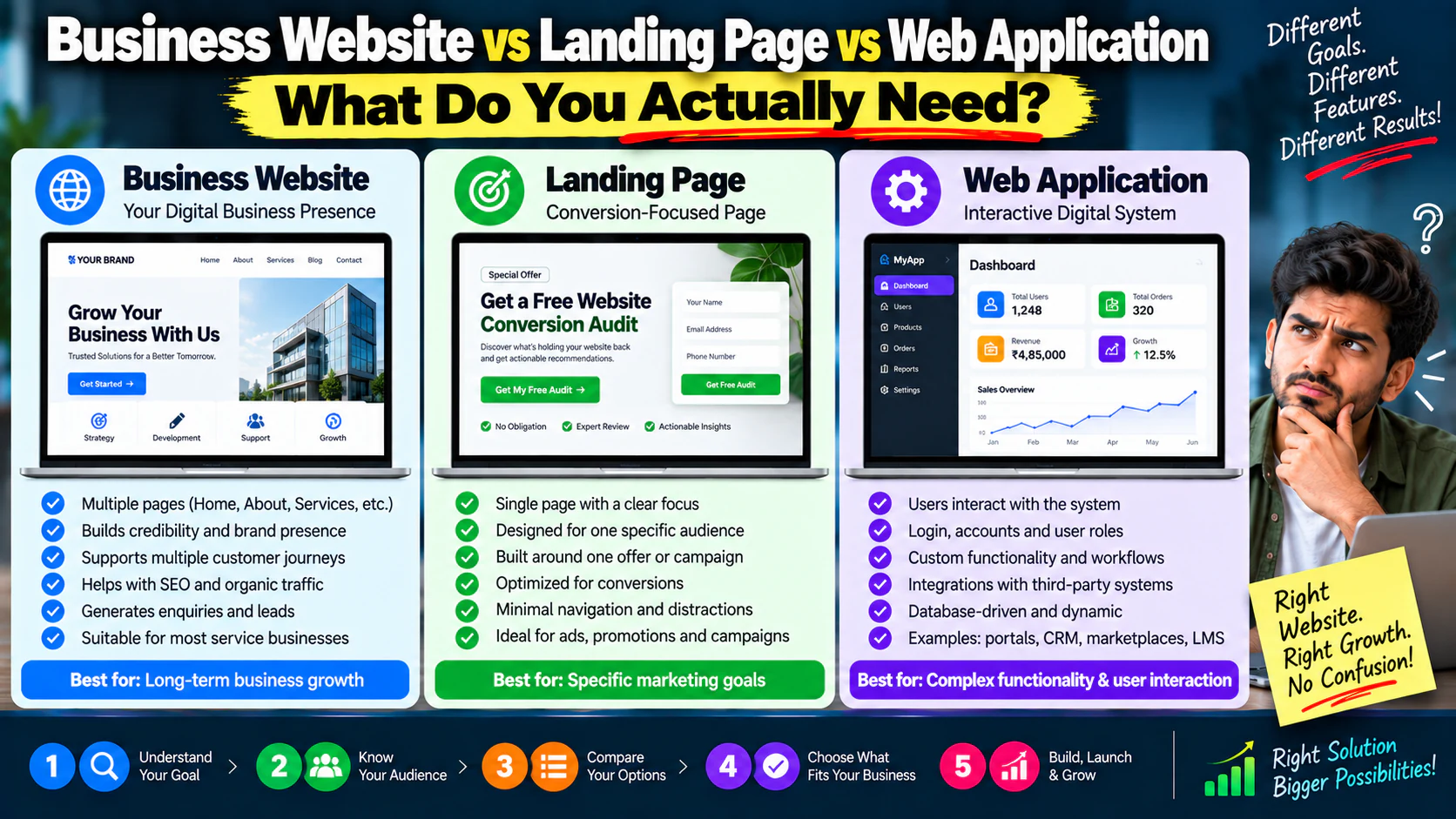
Website vs Landing Page vs Web Application: The Simple Difference
At the highest level:
Business Website
Built to represent a business and support multiple customer journeys.
Landing Page
Built around one specific campaign, offer, audience or conversion objective.
Web Application
Built to let users perform actions, interact with data or use a digital system.
Think of them like this:
The right choice depends on the job.
What Is a Business Website?
A business website is usually a collection of connected pages that explain the company, services, products, expertise and customer journey.
Typical pages include:
- Homepage
- About
- Services
- Individual service pages
- Industries
- Case studies
- Blog
- Contact
- FAQs
- Resources
The website has multiple purposes.
It may need to:
- Generate leads
- Rank in search engines
- Establish credibility
- Explain services
- Support sales
- Publish content
- Capture enquiries
- Support social media traffic
- Support paid campaigns
For most service businesses, this is the foundation.
What Is a Landing Page?
A landing page is much narrower.
Instead of trying to explain the entire company, it usually focuses on:
For example:
Get a Free Website Conversion Audit
The page might contain:
- Problem
- Benefits
- Process
- Proof
- FAQs
- Form
- CTA
It doesn't need to explain every service the company provides.
Its job is to move the visitor toward one action.
What Is a Web Application?
A web application is different again.
It isn't simply displaying information.
Users interact with the system.
Examples include:
- Customer portals
- Booking platforms
- SaaS products
- CRM systems
- Learning platforms
- Dashboards
- Project management tools
- Online calculators
- Financial platforms
- Marketplace systems
- Inventory management systems
The defining characteristic is:
They may:
- Log in
- Create an account
- Upload information
- Make payments
- Manage records
- Generate reports
- Configure settings
- Interact with databases
- Communicate with other users
That's application territory.
The First Question: What Is the Primary Business Goal?
Before choosing the technology, complete this sentence:
“We need this digital experience to \_\_\_\_\_\_.”
Examples:
The goal usually tells you more than the technology does.
When You Need a Business Website
A business website is usually the right choice when customers need to understand your company before contacting or buying from you.
Choose a website when you need:
- Multiple services
- Multiple pages
- Organic search visibility
- Brand credibility
- Educational content
- Case studies
- Multiple conversion paths
- Long-term content marketing
- Different customer journeys
For example, an SEO agency may need:
A single landing page would be too restrictive.
When You Need a Landing Page
A landing page is ideal when the visitor already has a specific context.
For example, you're running an ad:
“Get 20% Off Your First Consultation.”
Sending that visitor to your generic homepage creates unnecessary choices.
Instead:
That's a cleaner journey.
Landing pages are especially useful for:
- Google Ads
- Meta Ads
- Lead-generation campaigns
- Product launches
- Webinars
- Events
- Downloadable resources
- Limited-time offers
- Lead magnets
- Specific audience campaigns
When You Need a Web Application
A web application becomes appropriate when the business requires functionality that goes beyond content and forms.
Ask:
“Does the user need to log in and perform meaningful actions?”
If yes, you may be moving toward an application.
For example:
A normal website:
“See our available courses.”
A web application:
“Create an account, enroll in a course, watch lessons, complete assignments and track progress.”
That's not just a website.
It's a digital system.
The Most Common Mistake: Building an Application When a Website Would Work
Technology can be exciting.
A business owner may think:
“Let's build something completely custom.”
But if the actual requirement is:
- 5–10 pages
- Service information
- Blog
- Contact form
- Testimonials
- Basic lead capture
you probably don't need an elaborate application architecture.
You're creating complexity without business value.
The question isn't:
The question is:
The Opposite Mistake: Treating an Application Like a Website
The opposite can be even more expensive.
Suppose you're building a customer portal.
Users need to:
- Log in
- View orders
- Download invoices
- Update profiles
- Make payments
- Track requests
Trying to force this into a basic marketing website will eventually create limitations.
You need application-level functionality.
Don't choose a website because it sounds cheaper if the business actually needs software.
A Simple Decision Tree
Use this:
Do you mainly need to explain your business?
Do you need one focused campaign or offer?
Do users need to log in and interact with data?
Do you need all three?
That's completely possible.
A mature business may have:
They serve different purposes.
Website + Landing Pages Is Often the Best Combination
You don't necessarily have to choose one.
A business can have:
Main Website
For:
- SEO
- Brand
- Services
- Education
- Trust
Landing Pages
For:
- Paid campaigns
- Specific offers
- Specific audiences
- Conversion experiments
For example:
could contain the main business website.
Then campaigns could use dedicated landing experiences for:
Each page can be optimized around a specific conversion objective.
Don't Send Every Ad to Your Homepage
This is a common marketing mistake.
Imagine someone searches:
Your ad promises:
“Reduce wasted Google Ads spend.”
Then you send the visitor to:
where they see:
- SEO
- Web Development
- Social Media
- Branding
- Content
- Performance Marketing
- About Us
Now the visitor has to find what they originally wanted.
That's unnecessary friction.
The better journey is:
When a Landing Page Is Better Than a Full Website
Choose a landing page when:
- The offer is highly specific
- You're testing a new product
- You're running a short campaign
- You need a fast campaign asset
- You have one primary conversion
- You don't need extensive navigation
- Traffic comes from a controlled source
For example:
doesn't need 30 pages.
It needs a compelling page that explains:
- What the audit includes
- Who it's for
- What they'll receive
- Why they should trust you
- What happens after submission
When a Full Website Is Better
Choose a full website when:
- People need to research your company
- You offer multiple services
- You want long-term SEO traffic
- Your sales cycle requires education
- You need multiple content categories
- You want strong brand authority
- Different audiences need different pages
A website becomes especially valuable when customers compare providers before contacting you.
The SEO Difference
A full website gives you room to build search visibility around multiple topics.
For example:
Supporting content:
- SEO pricing
- Technical SEO
- Local SEO
- E-commerce SEO
- SEO audits
- SEO strategy
- Keyword research
- Content strategy
These pages can create a structured search ecosystem.
A landing page can rank too, but its purpose is usually much narrower.
The important principle is:
Website Architecture Matters
If your business website will support SEO, paid campaigns and conversions, architecture should be considered before design.
Think:
The visitor should be able to move naturally from:
to
to
to
Your website structure shouldn't be created page-by-page without a bigger plan.
The Difference in Conversion Strategy
Business Website
Optimizes multiple journeys.
A visitor may:
Landing Page
Optimizes one journey.
Web Application
Optimizes user interaction.
That's why applying the same UX strategy to all three doesn't work.
The Difference in Content
A business website may need:
- Service descriptions
- About information
- Case studies
- FAQs
- Blog articles
- Resources
- Industry pages
A landing page may need:
- Offer
- Benefits
- Proof
- Objection handling
- CTA
A web application may need:
- Dashboard
- User interface
- Help documentation
- Account settings
- Notifications
- Transactional workflows
Different product.
Different content architecture.
The Difference in Development Complexity
In general:
Lowest functional complexity.
Moderate complexity.
Potentially high complexity.
But don't interpret that as:
“Always choose the cheapest option.”
Instead:
Website vs Landing Page vs Web App
| Requirement | Website | Landing Page | Web Application |
|---|---|---|---|
| Company information | ✓ | Limited | Optional |
| Multiple services | ✓ | Usually no | Optional |
| SEO content | ✓ | Limited | Usually not primary |
| Paid campaigns | ✓ | ✓✓ | Optional |
| One specific offer | Possible | ✓✓ | Rare |
| Lead generation | ✓ | ✓✓ | Possible |
| User login | Rare | Rare | ✓ |
| User dashboard | No | No | ✓ |
| Complex workflows | Limited | No | ✓ |
| Database-driven features | Limited | Rare | ✓ |
| Customer portal | No | No | ✓ |
| Long-term content strategy | ✓ | Limited | Optional |
What About E-commerce?
E-commerce sits somewhere between a website and application-style functionality.
You may need:
- Product catalog
- Product pages
- Cart
- Checkout
- Payments
- Customer accounts
- Orders
- Inventory
- Shipping
- Coupons
A small e-commerce store can often use an established platform.
A complex marketplace with:
- Multiple sellers
- Commission logic
- Vendor dashboards
- Advanced inventory
- Custom payment workflows
may require significantly more custom development.
Again:
What About Booking Websites?
A simple booking requirement doesn't automatically mean you need a custom application.
For example:
Choose service → Select date → Select time → Submit details.
This can potentially be handled with an existing booking solution.
But if you need:
- Complex availability rules
- Multiple providers
- Dynamic pricing
- Memberships
- Automated workflows
- Customer dashboards
- Staff dashboards
- Payment logic
the technical requirements become much more sophisticated.
Start with the workflow.
Then choose the technology.
What About a Customer Portal?
If customers need to log in and see personalized information, you're entering application territory.
For example:
This is fundamentally different from:
Don't confuse the two.
Don't Choose Technology Before Requirements
One of the worst project sequences is:
Then:
“What should the system actually do?”
Reverse the order.
Step 1
Define business objective.
Step 2
Define users.
Step 3
Define workflows.
Step 4
Define pages/features.
Step 5
Define integrations.
Step 6
Define technical requirements.
Step 7
Choose the development approach.
Technology should serve the requirement.
A Website Project Should Begin With a Requirements Document
Before development, document:
Business goals
What should the project achieve?
Audience
Who will use it?
Content
What information needs to exist?
Features
What must users be able to do?
Integrations
What external systems are required?
SEO
Which pages need search visibility?
Conversion
What actions matter?
Analytics
What needs to be tracked?
Maintenance
Who will manage it after launch?
This prevents expensive misunderstandings.
Calculate the Cost of Complexity
Suppose a simple business website costs:
A custom web application might cost:
That doesn't automatically mean the application is overpriced.
If the application creates:
or:
the economics may make sense.
But if the business only needed:
then spending ₹8 lakh on custom functionality is difficult to justify.
Always connect development cost to business value.
Ask These 15 Questions Before Choosing
- What is the primary business objective?
- Who is the primary user?
- How many audiences do we serve?
- How many services/products do we have?
- Do we need SEO?
- Will we run paid advertising?
- Do we need multiple landing pages?
- Does anyone need to log in?
- Does the user need personalized information?
- Do users need to perform transactions?
- Do we need third-party integrations?
- Do we need a database?
- Who will update the content?
- What must be tracked?
- What should the system become in 2–3 years?
These questions often make the right architecture much clearer.
Think About the Next Three Years
Don't build only for today.
But don't overbuild for an imaginary future either.
Ask:
“What is reasonably likely to happen?”
For example:
Today:
In 12 months:
In 24 months:
You might design the initial architecture with future integration in mind without building the entire portal today.
That's better than either extreme:
or
MVP Does Not Mean Bad Website
An MVP means:
It does not mean:
- Cheap-looking
- Broken UX
- Missing essential information
- Poor mobile experience
- No analytics
- No SEO foundation
A good MVP removes unnecessary complexity while protecting important functionality.
Your First Version Should Answer One Question
For a business website:
Can the right visitor understand and trust the business enough to enquire?
For a landing page:
Can the campaign visitor understand the offer and convert?
For an application:
Can the user complete the intended workflow successfully?
That should define your first release.
Don't Let Designers Decide the Entire Product
Design is important.
But design should follow:
If you start with colors, animations and layouts, you may create a beautiful interface for the wrong product.
Don't Let Developers Decide the Business Strategy
The reverse is also true.
A developer may say:
“This is technically easier.”
But the technically easiest solution isn't always commercially best.
The business needs to decide:
- Who the customer is
- What the offer is
- What the desired action is
- What workflows matter
- What success means
Then development determines the best technical way to deliver it.
The Right Architecture Depends on the Customer Journey
Think from the user's perspective.
Visitor wants information
Visitor has a specific campaign offer
Visitor needs personalized interaction
Visitor needs all three
This is much more useful than asking:
“Which platform is best?”
A Practical Example: Digital Marketing Agency
Imagine a digital agency.
Main Website
Pages:
- Home
- SEO
- Paid Marketing
- Social Media
- Web Development
- Case Studies
- Blog
- Contact
Purpose:
Landing Pages
Campaign-specific:
- Free SEO Audit
- Google Ads Audit
- Website Conversion Audit
Purpose:
Client Portal
Clients can:
- Login
- View reports
- See campaign performance
- Download invoices
- Submit requests
Purpose:
One business.
Three digital experiences.
Each has a different job.
The Most Important Rule
Don't ask:
Ask:
“What experience does the customer need, and what does the business need that experience to accomplish?”
Then choose the simplest architecture that delivers it.
A Quick Decision Matrix
Choose a Business Website if:
✓ You need a professional online presence ✓ You have multiple services ✓ SEO matters ✓ Customers research before contacting you ✓ You need content and case studies
Choose a Landing Page if:
✓ You have one offer ✓ You're running a campaign ✓ You need one conversion goal ✓ You want a focused user journey ✓ You're testing an offer
Choose a Web Application if:
✓ Users need accounts ✓ Users need dashboards ✓ Users interact with personalized data ✓ Complex workflows are required ✓ The website itself is becoming a software product
What Should You Build First?
For many businesses, a sensible progression is:
This approach reduces unnecessary upfront investment.
Before Hiring a Developer
Prepare these items:
Business brief
What does the company do?
Audience
Who are you targeting?
Goals
What should the website achieve?
Sitemap
What pages are required?
Features
What functionality is needed?
Integrations
What external tools are involved?
Content
Who provides copy, images and videos?
SEO
Which pages need organic visibility?
Conversion
What are the primary CTAs?
Analytics
What events and conversions need tracking?
Maintenance
Who handles updates?
The clearer the brief, the fewer surprises you'll face later.
Don't Start With “How Much Does a Website Cost?”
Start with:
Then:
Then:
Only then should you ask:
Otherwise, you are comparing prices for completely different products.
A ₹75,000 website and a ₹7,50,000 web application are not comparable simply because both are called “web development.”
Your Website Should Be Built for Marketing From Day One
If you're going to invest in a website, don't build a system that marketing teams struggle to use.
Make sure it can support:
- SEO
- Analytics
- Conversion tracking
- Content publishing
- Landing pages
- Forms
- CRM integration
- Paid campaigns
- Social traffic
- Performance optimization
A website should make marketing easier—not become a bottleneck.
The Final Decision Framework
Use this simple framework:
Step 1 — Define the goal
Step 2 — Define the user
Step 3 — Define the interaction
Step 4 — Define the scale
Step 5 — Define the future
Step 6 — Choose the architecture
or
or
or
Step 7 — Choose technology
Only now decide:
This order prevents technology from driving business decisions.