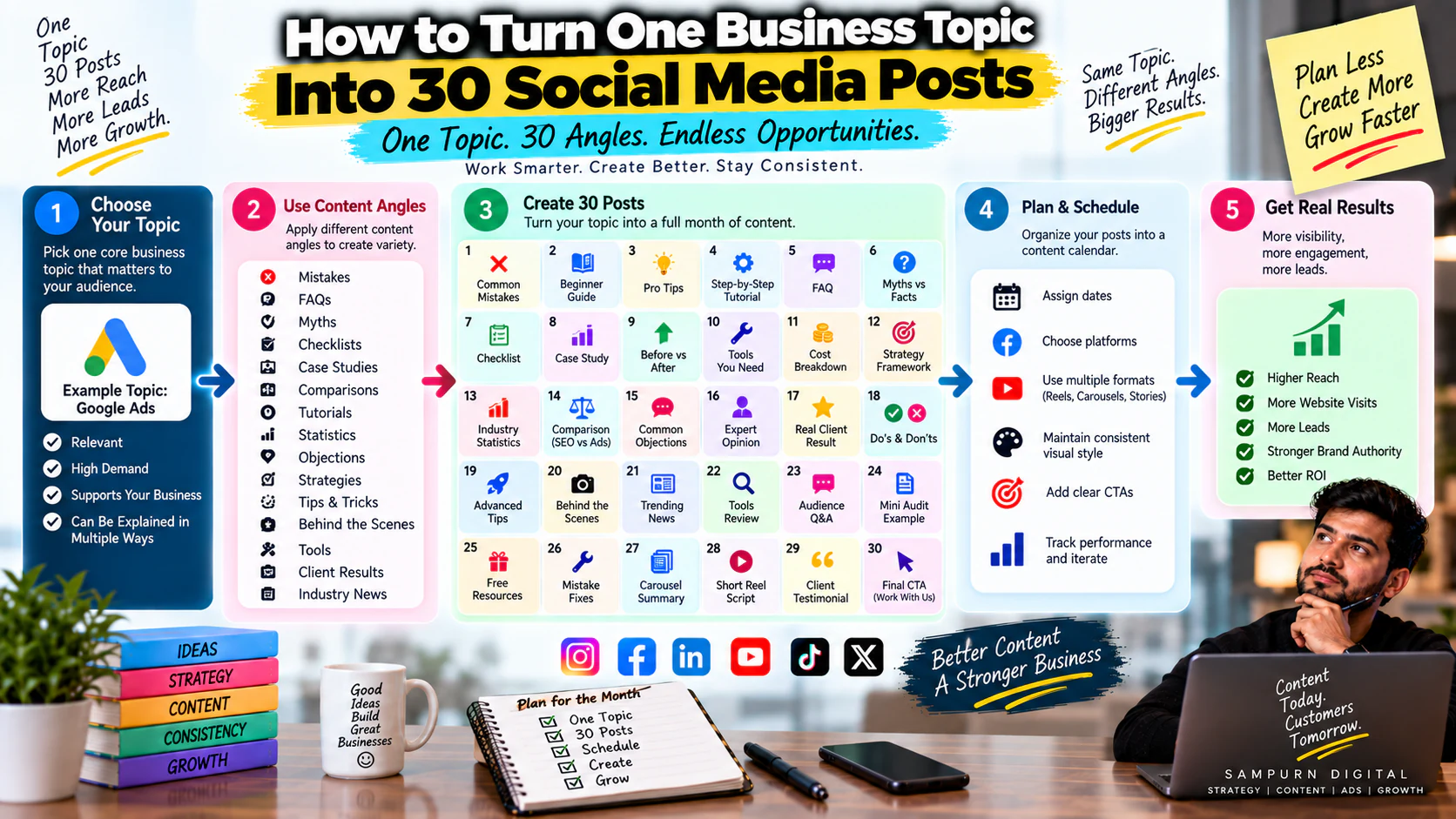
One of the biggest problems with social media content isn't a lack of ideas.
It's the opposite.
You have too many ideas in your head, but no system for turning them into consistent content.
So your team spends an hour trying to decide what to post.
Then another hour creating it.
Then the next day starts with the same question:
“What should we post today?”
There is a much better approach.
Instead of trying to invent 30 different topics, take one strong business topic and turn it into 30 different content angles.
For example, suppose your core topic is:
That single topic can become:
- Mistakes
- FAQs
- Myths
- Checklists
- Case studies
- Comparisons
- Tutorials
- Statistics
- Objections
- Strategy posts
- Reels
- Carousels
- Stories
- Commercial content
You don't need 30 unrelated ideas.
You need one useful topic + a structured repurposing system.
This guide shows exactly how to do it.
Why Most Businesses Struggle to Create Enough Content
Imagine your marketing team wants to publish five posts every week.
That's roughly:
If every post requires a completely new subject, the team has to continuously research new topics.
That creates:
- Brainstorming fatigue
- Repetitive generic posts
- Inconsistent quality
- Content delays
- Random publishing
- Weak strategic alignment
But your customers don't need you to introduce a completely new subject every day.
They need you to explain the same important problems from different angles.
Think about how people learn.
Someone may need:
- A basic explanation
- An example
- A mistake to avoid
- A comparison
- A checklist
- A case study
- A practical process
That's six pieces of content around the same underlying subject.
The Core Idea: One Topic ≠ One Post
Let's take:
A weak content strategy says:
“We already posted about landing pages.”
A stronger strategy asks:
“How many useful questions can we answer about landing pages?”
For example:
- What is a landing page?
- Why do landing pages matter?
- Homepage vs landing page
- Landing page mistakes
- CTA mistakes
- Headline mistakes
- Form mistakes
- Mobile mistakes
- Trust signals
- Before/after example
You've already created ten content opportunities.
The subject didn't change.
The angle changed.
That's the foundation of content repurposing.
The 30-Post Content Expansion Framework
A practical framework is to take one business topic and explore it through six content categories:
Questions
5 posts
Problems & Mistakes
5 posts
Educational Concepts
5 posts
Strategies & How-To
5 posts
Proof, Examples & Comparisons
5 posts
Commercial & Conversion Content
5 posts
Total:
Let's break this down.
Category 1: Five Question-Based Posts
Questions are one of the easiest ways to turn a topic into content.
Take:
Potential questions include:
Post 1
“What is SEO actually supposed to do for a business?”
Post 2
“How long does SEO take to produce results?”
Post 3
“Can SEO work for a small business?”
Post 4
“Should you invest in SEO if you're already running Google Ads?”
Post 5
“What should you check before hiring an SEO agency?”
Each post addresses a different customer question.
You don't need a new subject.
You need a new question.
Category 2: Five Problem and Mistake Posts
Problems create highly relevant content because customers are usually searching for solutions after something goes wrong.
Take:
Create:
Post 6
“Why Google Ads clicks aren't turning into leads.”
Post 7
“5 negative keyword mistakes wasting your budget.”
Post 8
“Why your cost per lead keeps increasing.”
Post 9
“Why your Google Ads generate leads but poor-quality leads.”
Post 10
“Why your campaign gets impressions but few conversions.”
Now one topic has generated five diagnostic posts.
Category 3: Five Educational Posts
Now explain the underlying concepts.
Post 11
“How Google Ads bidding actually works.”
Post 12
“What is Quality Score?”
Post 13
“What is search intent?”
Post 14
“What is conversion tracking?”
Post 15
“What is the difference between CPA and ROAS?”
These posts build understanding.
They are particularly useful for audiences who are problem aware but not yet solution aware.
Category 4: Five Strategy and How-To Posts
Now move from:
to:
Post 16
“How to structure a Google Ads campaign around business intent.”
Post 17
“How to find wasted spend from search terms.”
Post 18
“How to build a negative keyword list.”
Post 19
“How to decide which campaigns deserve more budget.”
Post 20
“How to improve lead quality without simply reducing ad spend.”
These posts demonstrate expertise.
Category 5: Five Proof, Example and Comparison Posts
This is where your content becomes more tangible.
Post 21
“Before vs after: restructuring a Google Ads campaign.”
Post 22
“Broad match vs phrase match: when should you use each?”
Post 23
“₹50,000 monthly ad budget: what could the structure look like?”
Post 24
“Example: why one campaign generated 3× more qualified leads.”
Post 25
“Google Ads vs Meta Ads: which is better for this type of business?”
Now you're not simply teaching.
You're helping people evaluate decisions.
Category 6: Five Commercial Posts
The final category connects the topic to your business.
Post 26
“When should a business hire a Google Ads agency?”
Post 27
“What should a Google Ads audit include?”
Post 28
“How much should a business realistically spend on Google Ads?”
Post 29
“What does a professional paid advertising management process look like?”
Post 30
“How to know whether your Google Ads account needs restructuring.”
Now your 30-post system covers:
The 30-Post Framework at a Glance
| Category | Posts |
|---|---|
| Questions | 5 |
| Problems & Mistakes | 5 |
| Education | 5 |
| Strategy & How-To | 5 |
| Proof & Comparisons | 5 |
| Commercial | 5 |
| Total | 30 |
This structure works because you're changing the purpose and angle, not randomly changing the subject.
Example: Turn “Social Media Marketing” Into 30 Posts
Let's make this more practical.
Your topic:
Questions
- What should a business actually expect from social media?
- Which social media platform is right for my business?
- How often should a business post?
- Should a business focus on Reels or carousels?
- How long does social media marketing take to produce results?
Problems
- Why your social media gets views but no leads.
- Why Instagram reach is declining.
- Why people watch Reels but don't take action.
- Why engagement is high but enquiries are low.
- Why your content feels repetitive.
Education
- What are social media content pillars?
- What is social media audience segmentation?
- What is social media engagement rate?
- What is the difference between reach and impressions?
- What makes a good social media hook?
Strategy
- How to build a social media content pillar system.
- How to create a monthly content calendar.
- How to plan a Reel for lead generation.
- How to use analytics to decide what to post next.
- How to connect social media content to website leads.
Proof / Comparison
- Organic vs paid social.
- Instagram vs LinkedIn for B2B.
- High views vs high-quality leads.
- Viral content vs conversion content.
- Before vs after: improving a weak social profile.
Commercial
- When should a business hire a social media agency?
- What does social media management actually include?
- How much should a business invest in social media?
- How do you measure social media ROI?
- What should a social media growth strategy include?
One topic.
Thirty useful posts.
Choose a Strong Core Topic
Not every subject deserves 30 posts.
Choose something that is:
- Relevant to your business
- Important to your audience
- Broad enough
- Connected to your expertise
- Capable of supporting multiple subtopics
- Relevant to your products or services
Good examples:
- SEO
- Google Ads
- Social media marketing
- Website conversion
- E-commerce growth
- Lead generation
- Content marketing
Weak examples:
- One tiny technical setting
- A temporary trend
- A very narrow product feature
- A topic with no commercial relevance
The goal is to choose a content parent, not a single content idea.
Define the Audience
The same topic can produce completely different content depending on who you're targeting.
Take:
For a beginner:
“What are Google Ads?”
For an e-commerce owner:
“How to structure Google Shopping campaigns.”
For a B2B company:
“How to reduce low-quality leads from search campaigns.”
For an agency owner:
“How to audit Google Ads accounts efficiently.”
The topic stays the same.
The audience changes the angle.
List Customer Questions
Open a simple document.
Write:
“What does my customer ask about this topic?”
Don't try to make the questions clever.
Write the real questions.
Examples:
- How much does it cost?
- How long does it take?
- Does it work?
- What should I do first?
- What mistakes should I avoid?
- Which option is better?
- Why isn't it working?
- How do I measure results?
- When should I hire someone?
- What happens after I start?
These questions become content.
List Customer Problems
Now change the question:
“What goes wrong?”
For example:
SEO
- Rankings don't improve
- Traffic doesn't convert
- Pages don't get indexed
- Content doesn't rank
- Competitors outrank them
Social Media
- Low reach
- Low engagement
- No leads
- Weak content
- Wrong audience
Paid Ads
- High CPC
- High CPA
- Poor lead quality
- Wasted spend
- Low conversion rate
Every problem is a potential post.
List Mistakes
People love content that helps them avoid expensive mistakes.
For example:
- Weak headline
- Too many CTAs
- Confusing navigation
- Long forms
- No proof
- Slow mobile experience
- Weak offer
Now convert them into content:
“7 website mistakes costing you leads.”
Or split them:
“Why your CTA isn't converting.”
“Why long forms can reduce enquiries.”
“Why your homepage isn't a good landing page for every campaign.”
One topic creates multiple angles.
Add Comparisons
Comparison content is particularly useful for solution-aware audiences.
Examples:
- Organic vs paid
- SEO vs PPC
- Homepage vs landing page
- Instagram vs LinkedIn
- Reels vs carousels
- Google Ads vs Meta Ads
- Traffic vs conversions
Comparisons answer:
“Which option should I choose?”
That makes them valuable commercially.
Add “How To” Content
Now create practical tutorials.
Use the formula:
Examples:
How to improve landing page conversion.
How to reduce wasted Google Ads spend.
How to build social media content pillars.
How to identify weak content patterns.
How to turn website traffic into enquiries.
How-to content demonstrates that you understand not only what the problem is, but also how to solve it.
Add Case Studies and Examples
Generic advice is easy to ignore.
Examples make it tangible.
Instead of:
“Improve your landing page.”
Create:
“A service landing page gets 2,000 monthly visitors but only 20 enquiries. Here's what we'd check first.”
Now the audience can see the problem.
Use realistic scenarios if you can't disclose client information.
For example:
Scenario
Monthly traffic:
10,000 visitors
Conversion rate:
0.5%
Leads:
50
If the conversion rate improves to:
1.2%
Leads become:
120
The traffic hasn't changed.
The conversion efficiency has.
That's a strong educational example.
Add Data and Calculations
Numbers create another layer of content.
For example, a paid advertising topic can become:
Budget calculation
₹60,000 monthly spend
Average CPC:
₹60
Potential clicks:
1,000
If landing-page conversion is:
5%
Potential leads:
50
If conversion improves to:
8%
Potential leads:
80
Now the same topic can teach:
This is much more useful than generic advice.
Add Myths and Misconceptions
Every industry has assumptions worth challenging.
Examples:
“More followers automatically means more customers.”
“SEO is free traffic.”
“More Google Ads budget always means more sales.”
“A beautiful website automatically converts.”
“Going viral means your social strategy is working.”
These make strong hooks.
But make sure your explanation is useful rather than controversial for the sake of attention.
Add Objection Content
Potential customers often hesitate because of objections.
Create content around:
- Cost
- Time
- Risk
- Complexity
- Results
- Internal resources
- ROI
Examples:
“Is SEO worth it if you need leads quickly?”
“Should a small business spend ₹30,000/month on ads?”
“Do you need a website redesign or just better landing pages?”
This content helps move people closer to a decision.
Add Commercial Content
Eventually the audience needs to understand:
Commercial content can explain:
- Services
- Processes
- Packages
- Audits
- Consultations
- Implementation
- Strategy
Don't make every post promotional.
But don't hide your commercial value either.
A good content system gives people a path from:
Turn One Topic Into Multiple Formats
You don't have to publish all 30 as Reels.
Take one idea:
“Why your landing page isn't converting.”
Turn it into:
Reel
3 landing page conversion mistakes.
Carousel
Landing page audit checklist.
Story
Poll:
“Does your website generate enough enquiries?”
Static
One strong conversion principle.
Video
5-minute landing page teardown.
Case study
Before/after example.
Same core idea.
Different consumption format.
Don't Copy-Paste the Same Post Everywhere
Repurposing doesn't mean:
Copy the Instagram caption → paste to LinkedIn → publish.
Each platform has a different content environment.
The same insight can be adapted.
Short hook + visual explanation.
Business context + analysis.
YouTube
Detailed walkthrough.
Website
Long-form guide.
Short insight + recommendation.
The idea stays consistent.
The execution changes.
Use the “One Big Idea” Method
A particularly efficient workflow is:
Step 1
Choose one big topic.
Example:
Step 2
Write a comprehensive internal brief.
Cover:
- Problems
- Causes
- Examples
- Strategies
- Mistakes
- Metrics
- FAQs
Step 3
Extract smaller ideas.
You might discover:
- Lead quality
- Landing pages
- Forms
- CTAs
- Paid ads
- Social media
- SEO
- Follow-up
- Tracking
Step 4
Turn each into content.
Now one research session can power an entire month.
Build a Content Atomization Tree
Think of your content like this:
For example:
Core Topic
Lead Generation
Subtopics
- Traffic
- Landing pages
- Offers
- Lead capture
- Follow-up
Each subtopic gets:
- Question
- Problem
- Mistake
- Strategy
- Example
That's already:
Add five commercial or comparison posts and you're at 30.
Create a 30-Post Spreadsheet
A simple content sheet can contain:
| \# | Topic | Angle | Format | Funnel | CTA | Status |
|---|---|---|---|---|---|---|
| 1 | SEO | Question | Reel | Awareness | Save | Idea |
| 2 | SEO | Mistake | Carousel | Problem | Save | Idea |
| 3 | SEO | How-to | Reel | Consideration | Follow | Idea |
| 4 | SEO | Case study | Carousel | Trust | Read | Idea |
| 5 | SEO | Service | Reel | Conversion | Enquire | Idea |
This makes content production operational.
Add a Funnel Stage to Every Post
Not all content should serve the same purpose.
Label each idea:
Awareness
Attract attention.
Problem Awareness
Help people recognize a problem.
Solution Aware
Teach possible approaches.
Product/Service Aware
Explain why your solution may be appropriate.
Conversion
Create action.
A healthy 30-post batch should ideally cover multiple stages.
Add a CTA to Every Post
The CTA doesn't always need to be:
“Contact us.”
Instead, match it to the content.
Awareness
Educational
Diagnostic
Trust
Consideration
Conversion
This creates a natural progression.
Example: One Topic → One Month of Content
Suppose the topic is:
Week 1 — Education
- What are content pillars?
- Why random posting doesn't work.
- How to define content themes.
- How many pillars should a business have?
- Content pillar mistakes.
Week 2 — Problems
- Why your content feels repetitive.
- Why your posts get views but no leads.
- Why engagement is declining.
- Why your team can't create content consistently.
- Why copying competitors doesn't work.
Week 3 — Strategy
- How to build content pillars.
- How to turn one topic into 30 posts.
- How to build a content calendar.
- How to choose formats.
- How to connect content to funnel stages.
Week 4 — Proof & Commercial
- Example content pillar system.
- Before/after content strategy.
- Organic vs paid distribution.
- What a social media strategy should include.
- When to hire a social media agency.
And continue expanding the remaining angles until you reach 30.
The important point is that one strategic topic can support an entire content cycle.
How to Avoid Repetitive Content
Repurposing becomes boring when only the wording changes.
Avoid:
“5 SEO tips”
“5 more SEO tips”
“5 SEO tips you need”
Instead, change the question.
Topic
SEO
Different angles
- Problem
- Cause
- Mistake
- Example
- Myth
- Comparison
- Checklist
- Strategy
- Data
- Case study
- FAQ
- Objection
This creates meaningful variety.
The “Angle Bank”
Build a permanent angle bank for your team.
Whenever you choose a topic, run it through:
Questions
What does the audience want to know?
Problems
What goes wrong?
Mistakes
What are people doing incorrectly?
Myths
What do people misunderstand?
How-To
What should they do?
Examples
What does it look like in practice?
Comparisons
What choices do they have?
Data
What numbers help explain it?
Case Studies
What happened in a real or realistic scenario?
Objections
Why might someone hesitate?
Checklist
What should they verify?
Commercial
When should they consider a solution?
This gives you a repeatable ideation engine.
When Should You Stop Repurposing a Topic?
Not every topic needs endless content.
Stop when:
- New posts become repetitive
- Audience engagement declines consistently
- The topic no longer supports business goals
- You've answered the major questions
- Another topic has greater commercial value
- New audience needs emerge
Then move to another core topic.
The objective isn't:
It's:
Measure the 30 Posts Together
Don't evaluate every post in isolation.
Look at the topic as a portfolio.
For example:
| Metric | Result |
|---|---|
| Total posts | 30 |
| Total views | 450,000 |
| Profile visits | 9,000 |
| Website clicks | 1,200 |
| Leads | 85 |
| Qualified leads | 48 |
| Customers | 11 |
Now you can ask:
Maybe:
- Case studies generated the most leads.
- Problem posts generated the most profile visits.
- Educational posts generated the most saves.
- Commercial posts generated the highest lead rate.
Those insights should influence the next 30-post batch.
The Real Advantage of Content Repurposing
The biggest benefit isn't simply saving time.
It's consistency of expertise.
When your brand repeatedly discusses an important subject from multiple angles, the audience starts to associate your business with that subject.
For example:
You discuss:
- Traffic
- Ads
- Landing pages
- Offers
- Forms
- Conversion
- Tracking
- Follow-up
Over time, your content creates a recognizable area of authority.
That is much stronger than posting 30 unrelated tips.
Use Your Content Pillars as the Starting Point
If you've already built a social media content pillar system, don't start from scratch.
Take one pillar.
Then expand it.
For example:
This is why a content pillar system and content repurposing work so well together.
Your next step after generating the ideas is to organize them into a monthly social media content calendar that connects content to business goals.
A Complete One-Topic-to-30 Workflow
Here's the process your team can repeat every month.
Step 1
Choose one core business topic.
Step 2
Define the target audience.
Step 3
List 5 customer questions.
Step 4
List 5 problems.
Step 5
List 5 educational concepts.
Step 6
List 5 strategies.
Step 7
List 5 examples/comparisons.
Step 8
List 5 commercial topics.
Step 9
Assign formats.
Step 10
Assign funnel stages.
Step 11
Assign CTAs.
Step 12
Schedule the content.
Step 13
Publish and measure.
Step 14
Identify winning angles.
Step 15
Turn winners into the next content batch.
Now you have a repeatable content engine rather than a daily brainstorming problem.
Final 30-Post Template
Use this every time you need to expand a business topic.
| Category | Idea 1 | Idea 2 | Idea 3 | Idea 4 | Idea 5 |
|---|---|---|---|---|---|
| Questions | |||||
| Problems | |||||
| Mistakes | |||||
| Education | |||||
| How-To | |||||
| Comparisons | |||||
| Examples | |||||
| Case Studies | |||||
| Objections | |||||
| Commercial |
You don't have to use every category every time.
The framework exists to help you think beyond:
“What should we post?”
SEO Publishing Information
| Field | Details |
|---|---|
| Blog ID | SMM-12 |
| Category | Social Media Marketing |
| Stage | Build |
| Primary Keyword | Turn one topic into 30 social media posts |
| Supporting Keywords | Content repurposing strategy; social media content ideas; one topic multiple posts |
| Search Intent | Informational |
| Funnel Stage | Solution Aware |
| Pillar Page | Social Media Marketing Services |
| Suggested URL | `/blog/social-media-marketing/how-to-turn-one-business-topic-into-30-social-media-posts` |
| Content Role | Implementation / how-to resource |
| Publishing Sprint | Sprint 4 |
| CTA | Get a social media growth strategy / Explore Social Media Marketing |
| H1 | How to Turn One Business Topic Into 30 Social Media Posts |
| Meta Title | How to Turn One Business Topic Into 30 Social Media Posts |
| Meta Description | Learn how to turn one business topic into 30 social media posts using content angles, repurposing frameworks, formats, funnel stages and practical examples. |