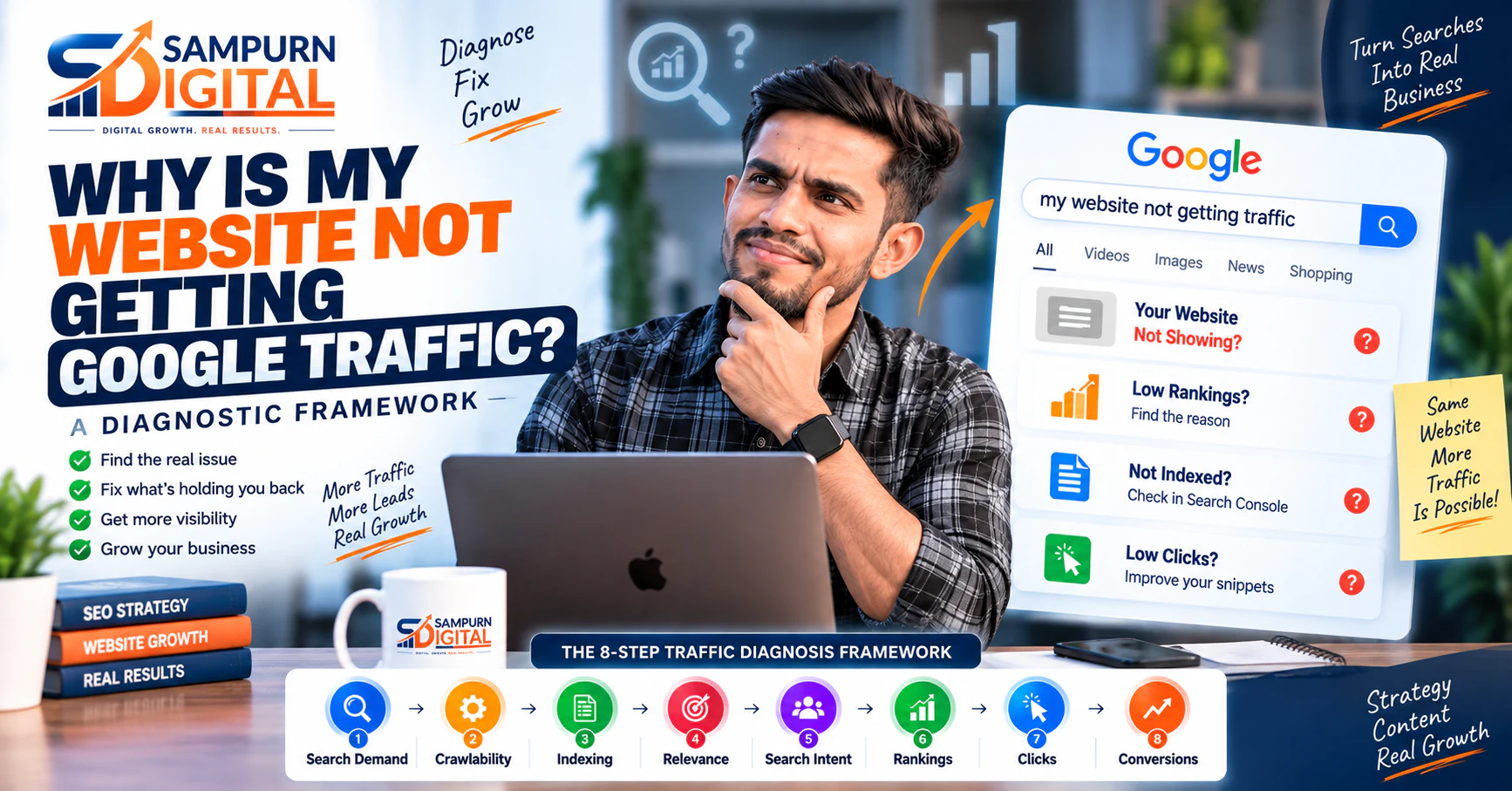
You published the website. You added important pages. You wrote blog posts. You may even have worked on keywords, technical SEO, and backlinks.
But Google traffic is still barely moving.
This is one of the most frustrating website traffic problems for a business owner because the website can look completely fine from the outside. The pages load. The design looks professional. The content appears useful.
Yet Google sends very few visitors.
So, why is my website not getting Google traffic?
The answer is rarely just one thing.
Organic search traffic depends on several systems working together:
If one of those systems has a significant weakness, your website may struggle to generate organic traffic even when other parts are working correctly.
The important thing is not to start changing everything at once.
Instead, diagnose the problem first.
This guide explains how to identify the most common reasons a website is not getting organic traffic and how to decide what should be fixed before investing more time or money into SEO.
First: Don't Assume You Have an SEO Problem
When organic traffic is low, many businesses immediately assume:
"We need more backlinks."
"We need to publish more blogs."
"We need to add more keywords."
Those things may eventually be part of the solution.
But they may not be the actual problem.
Imagine a website has 100 useful pages, but Google has only indexed 20 of them.
Publishing another 50 articles won't necessarily solve the underlying problem.
Likewise, if your website ranks on page five for highly competitive keywords, publishing more content without changing the strategy may simply create more pages that struggle to rank.
A better approach is to diagnose the website in stages.
A simple SEO traffic diagnosis looks like this:
If traffic is failing, identify where the chain is breaking.
That gives you a much more useful question than:
"What SEO tactic should we try next?"
Instead ask:
"Where exactly is the search-to-traffic system breaking?"
Once you know that, the next action becomes much clearer.
The 8 Reasons Your Website May Not Be Getting Google Traffic
Let's go through the most common causes in a practical order.
Google Hasn't Indexed Your Important Pages
The first question should be surprisingly simple:
A page cannot receive organic search traffic from Google if Google has not included that page in its search index.
This doesn't mean every page on your website needs to be indexed.
Some pages may intentionally be excluded, including certain utility pages, duplicate variations, account pages, internal search results, or other low-value URLs.
The important question is whether the pages that should generate visibility are discoverable, accessible, and eligible to appear in search.
Start with your most important URLs
Check the indexing status of:
- Homepage
- Service pages
- Category pages
- Product pages
- Location pages
- Important landing pages
- High-value blog posts
- Supporting content
Google Search Console is one of the most useful places to investigate these issues.
If important pages aren't indexed, don't immediately publish more content.
First determine why Google isn't indexing them.
Possible causes include:
- `noindex` directives
- Incorrect canonical tags
- Robots.txt restrictions
- Crawl issues
- Orphan pages
- Weak internal linking
- Duplicate URLs
- Very low-value pages
- Server or accessibility problems
- Incorrect redirects
- Poor site architecture
For example, if an important service page is accidentally marked `noindex`, publishing ten additional blog posts will not solve the underlying problem.
The correct response is to identify and fix the indexing issue.
If you need a systematic way to investigate the broader website, use this [50-point SEO audit checklist for a business website](https://www.sampurndigital.com/blog/seo/the-50-point-seo-audit-checklist-for-a-business-website).
Your Website Has Technical SEO Problems
A website can look perfectly normal to a human visitor while creating problems for search engines.
Technical SEO helps search engines crawl, access, understand, and process your website.
Potential technical problems include:
- Broken internal links
- Incorrect redirects
- Poor URL structures
- Canonicalization problems
- XML sitemap issues
- Robots.txt mistakes
- Duplicate URLs
- JavaScript rendering problems
- Slow pages
- Mobile usability issues
- Server errors
- Incorrect status codes
None of these automatically means your website will receive zero traffic.
The important question is:
That distinction matters.
For example, a minor technical warning on a low-value page may have little business impact.
But an important service page returning the wrong status code is a much bigger problem.
What should a technical SEO investigation cover?
At minimum, review:
- Crawlability
- Indexability
- Robots.txt
- XML sitemap
- Canonical tags
- HTTP status codes
- Redirects
- Broken links
- Duplicate URLs
- Mobile usability
- Page performance
- Core Web Vitals
- JavaScript-dependent content
- Internal linking
- Site architecture
The goal isn't to make every technical metric perfect.
The goal is to remove technical problems that can interfere with search visibility, usability, or conversions.
A broader website review can also reveal problems outside traditional SEO.
For example, a slow or poorly structured page can affect both organic search performance and conversion performance. This is where [conversion-focused web development and website optimization](https://www.sampurndigital.com/blog/web-development/website-audit-checklist-75-things-to-check-before-redesigning) becomes relevant.
Your Pages Are Indexed but Don't Match Search Intent
This is one of the most overlooked reasons for poor organic traffic.
A page can contain the right keyword and still be the wrong result for the search.
Consider someone searching:
"best accounting software for small business"
They probably want:
- Comparisons
- Features
- Pricing
- Advantages
- Limitations
- Recommendations
Now imagine a page titled:
"What Is Accounting Software?"
It may contain the words "accounting software" dozens of times.
But it doesn't satisfy what the searcher actually wants.
That's a search intent problem.
Search intent matters more than simply inserting keywords
Before creating or optimizing a page, ask:
Common search intent types include:
Informational intent
The person wants to understand something.
Examples:
- how does SEO work
- why is my website slow
- what is conversion rate optimization
- why is my website not getting organic traffic
Commercial investigation
The person is researching options before making a decision.
Examples:
- best SEO agency for startups
- SEO vs PPC
- WordPress vs custom website
- SEO agency for small businesses
Transactional intent
The person is closer to taking action.
Examples:
- SEO services
- hire SEO agency
- SEO consultant near me
Navigational intent
The person is looking for a specific website, company, brand, or page.
If your page doesn't satisfy the intent behind the query, adding more keywords usually won't solve the problem.
A useful next step is to map the query against the actual search results and determine what type of content Google is rewarding.
For a deeper framework, see this [practical guide to search intent mapping](https://www.sampurndigital.com/blog/seo/search-intent-mapping-how-to-match-pages-with-what-people-actually-want).
You're Targeting Keywords That Are Too Competitive
Sometimes the website isn't failing.
Imagine a new website trying to rank immediately for:
"digital marketing"
That's a broad topic with potentially significant competition.
A more specific search might be:
"digital marketing agency for local businesses"
"digital marketing strategy for a small e-commerce business"
The second type of query can be much closer to a specific audience and business need.
This doesn't mean you should only target low-volume keywords.
Instead, your keyword strategy should balance:
- Search demand
- Competition
- Search intent
- Business relevance
- Conversion potential
- Website authority
- Content depth
- Customer value
Search volume isn't the same as business value
A keyword receiving 10,000 searches per month isn't automatically better than one receiving 300.
Suppose:
Keyword A: 10,000 searches/month
Keyword B: 300 searches/month
If Keyword A brings mostly people looking for free information while Keyword B brings highly relevant potential customers, Keyword B may create significantly more business value.
This is why effective SEO traffic diagnosis shouldn't focus only on search volume.
You need to ask:
"If I rank for this keyword, what happens next?"
Does the visitor:
- Need your product?
- Need your service?
- Have a problem you can solve?
- Fit your target audience?
- Have potential commercial intent?
If the answer is no, large traffic numbers may not help the business.
Your Content Is Too Generic
Another common reason a website isn't getting organic traffic is that its content doesn't provide enough unique value.
The page may technically answer the question.
But so do hundreds of other pages.
For example:
What is SEO?
There are thousands of explanations available.
Writing another generic definition doesn't necessarily give users a strong reason to choose your page.
Instead, ask:
That might include:
- Original analysis
- Practical frameworks
- Examples
- Templates
- Decision trees
- Calculations
- Screenshots
- Industry-specific considerations
- Implementation steps
- Common mistakes
- Expert interpretation
- Updated information
- Real-world scenarios
The objective shouldn't be:
"How do I make this page longer?"
It should be:
"How do I make this page more useful?"
That's an important distinction.
A 2,500-word article can still be weak if it spends 2,000 words repeating information the reader already found elsewhere.
A shorter page can be more valuable if it directly solves the reader's problem.
Look for information gain
Before publishing or updating an article, ask:
That question forces you to move beyond keyword insertion and word count.
Your Website Has Content Cannibalization
Sometimes the problem isn't that you have too little content.
You have too much overlapping content.
Imagine a website has these pages:
- SEO services
- SEO company
- SEO agency
- SEO services for businesses
- Best SEO services
If all five pages target essentially the same search intent, Google may have difficulty determining which page should be the primary result.
This is commonly referred to as keyword cannibalization.
The same issue can happen with blog content.
For example:
- How to do keyword research
- Keyword research guide
- Complete keyword research tutorial
- Keyword research strategy
- How to find SEO keywords
These might be five genuinely useful articles.
Or they might be five versions of essentially the same article.
You need to evaluate:
- Search intent
- Audience
- Topic scope
- Page purpose
- Keyword target
- Search-result overlap
- Internal linking
- Existing rankings
A proper content audit should determine whether pages should be:
rather than automatically publishing more articles.
This is particularly important when a website has been publishing content for years without a clear keyword-to-page mapping system.
Your Internal Linking Is Weak
Google doesn't discover and understand a website through isolated pages.
Your site's structure matters.
Imagine you publish a detailed article about technical SEO.
But:
- No important page links to it.
- It isn't linked from your SEO service page.
- It isn't connected to related articles.
- No supporting content references it.
- It isn't part of a meaningful topic cluster.
That page may be harder for users and search engines to discover and understand in context.
Internal links help create relationships between related pages.
For example:
Now you have a connected information architecture instead of a collection of unrelated blog posts.
For example, if you're investigating whether your pages are actually being discovered by Google, you can continue with our guide to [Google indexing problems and why pages aren't appearing in search](https://www.sampurndigital.com/blog/seo/google-indexing-problems-why-your-pages-are-not-appearing-in-search).
The anchor should describe what the reader will find.
Don't write:
"For more information, click here."
Write:
"If you're trying to determine whether Google is actually accessing your pages, start with our guide to Google indexing problems."
The second version gives both the reader and search engine more context.
Internal links should also connect articles to the broader business journey.
For example, someone reading about SEO traffic problems may eventually need to understand [lead-generation website architecture for service businesses](https://www.sampurndigital.com/blog/web-development/lead-generation-website-architecture-for-service-businesses).
That makes the internal link useful rather than artificial.
Your Website May Have a Traffic Problem That Isn't Actually About Rankings
This is where SEO becomes more interesting.
Suppose your website ranks.
But organic traffic is still disappointing.
There are several possible explanations.
Your rankings may be too low
Being on page four doesn't create the same opportunity as appearing prominently for a relevant search.
A ranking position by itself also doesn't tell you whether the keyword is commercially valuable.
Your keywords may have little demand
A number-one ranking for a search nobody performs won't generate meaningful traffic.
Your search result may not attract clicks
You can have visibility without receiving many clicks.
Your title and description need to communicate clearly what the page offers and why it is relevant to the search.
Search results may satisfy users without requiring a click
Some searches can be answered directly within the search experience.
That means impressions and rankings should be interpreted alongside clicks and actual business outcomes.
You may be ranking for irrelevant queries
This is one of the biggest traps.
Traffic volume can increase while business results remain flat.
For example, a company selling premium B2B software might generate thousands of visits from beginner informational searches but very few qualified leads.
So don't ask only:
"Did traffic increase?"
Ask:
"Did relevant traffic increase?"
And then:
"Did that traffic produce business value?"
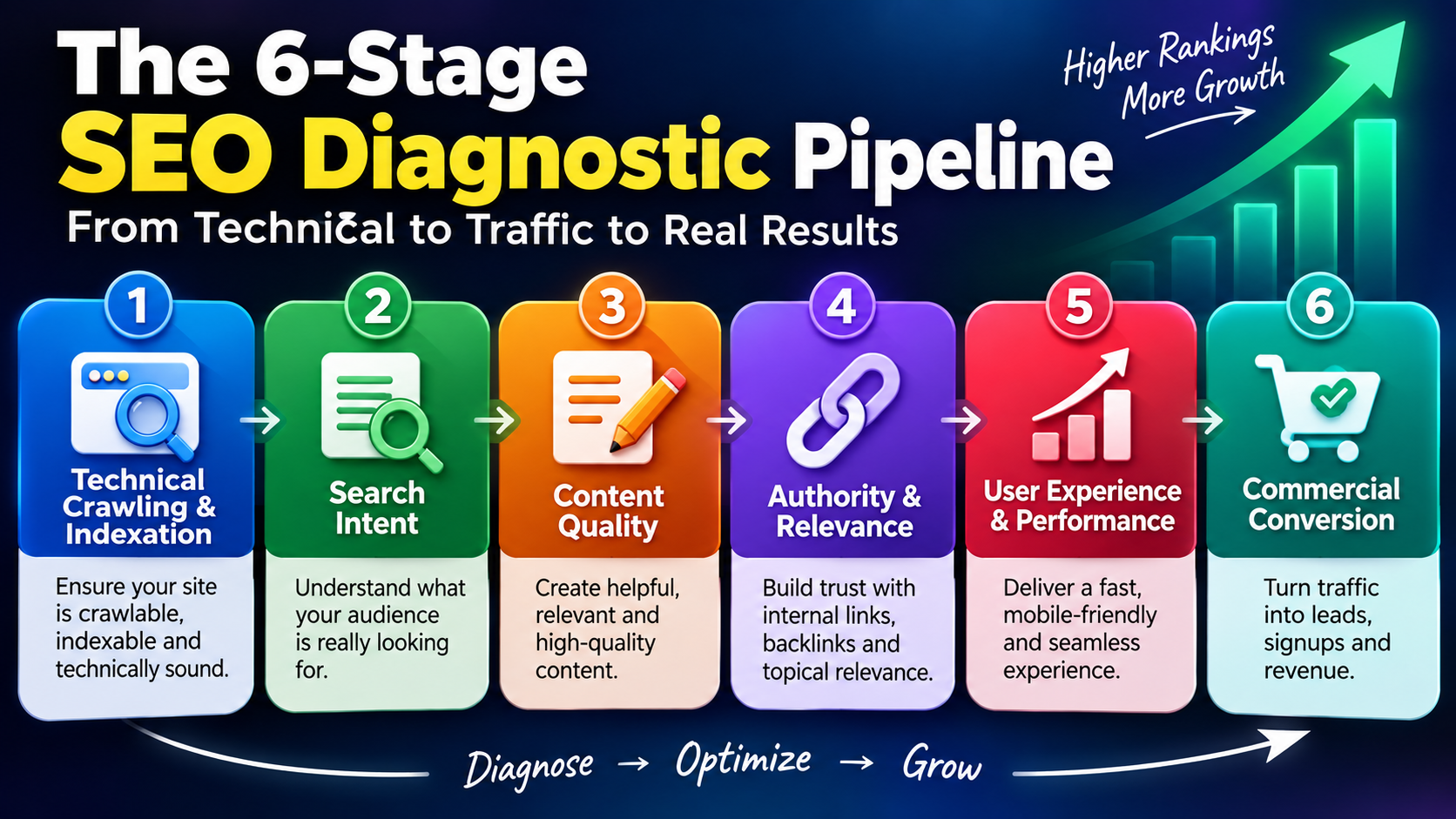
A Practical SEO Traffic Diagnosis Framework
If I were auditing a website with very little Google traffic, I wouldn't immediately rewrite the homepage title.
I'd work through the following sequence.
Confirm the Baseline
Before making changes, record:
- Organic sessions
- Organic users
- Search impressions
- Search clicks
- Click-through rate
- Indexed pages
- Ranking keywords
- Organic landing pages
- Organic conversions
- Leads or purchases from organic traffic
You need a baseline before changing anything.
Otherwise, you won't know whether your changes actually improved performance.
Also separate:
These are not the same thing.
For example:
That distinction can save a lot of wasted SEO effort.
Check Indexing
Create a list of your most important URLs.
Then determine:
Is each important page indexed?
If not, investigate why.
Don't treat every indexing issue as identical.
An intentional `noindex` on a low-value page is very different from an important service page accidentally being blocked from indexing.
Check your:
- Homepage
- Service pages
- Product pages
- Category pages
- Location pages
- Important articles
- High-value landing pages
Prioritize commercial pages first.
Check Technical Accessibility
Review:
- Crawlability
- Robots.txt
- XML sitemap
- Canonicals
- Status codes
- Redirects
- Broken links
- Mobile experience
- Page speed
- Core Web Vitals
- JavaScript-dependent content
The goal isn't technical perfection.
The goal is to remove problems that interfere with search visibility or user experience.
If your website is also suffering from structural or conversion issues, investigate the broader [website audit checklist covering architecture, performance, UX and redesign risks](https://www.sampurndigital.com/blog/web-development/website-audit-checklist-75-things-to-check-before-redesigning).
Map Keywords to Pages
For every important keyword, ask:
Which page on my website should rank for this search?
If the answer is:
"I'm not sure."
You may have a keyword mapping problem.
If two pages are competing for the same intent, you may have a cannibalization problem.
If no page exists, you may have a content gap.
This is why keyword research should not end with a spreadsheet full of keywords.
The final output should be a clear relationship:
That creates a much more usable SEO strategy.
Compare Search Intent
Look at the pages currently ranking.
Don't copy them.
Study what the search results reveal about the query.
Ask:
- What type of pages are ranking?
- Are they guides?
- Service pages?
- Product pages?
- Comparisons?
- Category pages?
- Location pages?
- Tutorials?
- Reviews?
Then ask:
If the search results are mostly comparison pages and you have published a generic definition, you may have an intent mismatch.
If the results are mostly service pages and your website only has a blog article, you may be targeting the wrong page type.
Evaluate Content Quality
Now inspect the actual page.
Ask:
Would someone genuinely find this page useful?
Check:
- Does it answer the question quickly?
- Does it provide enough depth?
- Is the information accurate?
- Is it original?
- Does it demonstrate expertise?
- Are examples included?
- Is the structure easy to scan?
- Does it answer related questions?
- Does it help the reader take the next step?
If the page feels like a rewritten version of the top-ranking results, it probably needs a stronger angle.
Don't simply add more paragraphs.
Add more usefulness.
Don't Fix Everything at Once
One of the biggest SEO mistakes is changing 20 things simultaneously.
Imagine you:
- Rewrite the title
- Change the URL
- Add 2,000 words
- Add 50 internal links
- Build backlinks
- Change the H1
- Redesign the page
- Change the keyword target
Then rankings increase.
What caused the improvement?
You don't know.
A better approach is to prioritize.
Use an Impact-versus-Effort Framework
High impact / relatively low effort
Examples:
- Fixing accidental `noindex`
- Correcting broken internal links
- Fixing obvious title problems
- Correcting important canonical issues
- Improving relevant internal links
- Fixing incorrect redirects
High impact / higher effort
Examples:
- Rebuilding site architecture
- Consolidating competing pages
- Creating a comprehensive topic cluster
- Reworking a major service page
- Solving serious technical problems
- Rebuilding weak content around search intent
Lower priority
Examples:
- Tiny wording changes
- Obsessing over exact keyword density
- Adding keywords unnaturally
- Publishing content simply because the editorial calendar says so
SEO becomes much more effective when the team fixes the biggest constraint first.
What If Your Website Is Brand New?
A new website should be treated differently from an established domain.
If you're launching a new business website, don't expect hundreds of competitive keywords to generate significant traffic immediately.
Your first phase should focus on building a strong foundation.
A practical first phase looks like this:
- Define your core services.
- Understand your target customers.
- Map commercial keywords to important pages.
- Build technically accessible pages.
- Create useful supporting content.
- Establish internal links.
- Build relevant authority.
- Measure Search Console and analytics data.
- Improve pages based on actual performance.
The important point is to build the foundation before chasing scale.
A new business can benefit from following a structured [SEO strategy for a new business during its first 90 days](https://www.sampurndigital.com/blog/seo/seo-strategy-for-a-new-business-what-should-you-do-in-the-first-90-days).
That approach helps connect keyword research, content, technical SEO, internal linking, authority and measurement instead of treating each activity as a separate task.
When Should You Perform a Full SEO Audit?
If you have been making SEO changes for months but still don't understand why organic traffic isn't growing, stop guessing.
Perform a structured audit.
A proper audit should investigate at least:
Technical SEO
Can Google crawl and access the important content?
Indexation
Are the right pages indexed?
Site Architecture
Can users and search engines understand the hierarchy of the website?
Content
Does each important page satisfy a clear search intent?
Keywords
Are you targeting valuable and realistic queries?
Internal Links
Are important pages connected to relevant supporting content?
Competitors
What are competing pages doing better?
Authority
Does the website have sufficient credibility and relevant external signals for its target queries?
Conversion
Once traffic arrives, does the website give visitors a clear next step?
For businesses that need a structured technical and strategic review, [SEO services focused on audits, technical SEO, content strategy and ongoing optimization](https://www.sampurndigital.com/seo-services) can provide a path from diagnosis to implementation.
SEO Traffic Is Not the Final Goal
This is probably the most important point in the entire article.
Suppose:
Website A: 20,000 organic visitors/month
Website B: 3,000 organic visitors/month
If Website B attracts people actively looking for its services while Website A attracts mostly irrelevant informational traffic, Website B may generate significantly more revenue.
So your real SEO funnel should look more like:
This is why SEO shouldn't operate separately from website development and conversion optimization.
A technically excellent SEO campaign can still underperform commercially if the landing page is:
- Confusing
- Slow
- Poorly structured
- Difficult to navigate
- Missing trust signals
- Missing a clear next step
SEO brings the opportunity.
The website needs to convert that opportunity.
A Simple SEO Traffic Checklist
If your website isn't getting Google traffic, run through this checklist.
Indexing
- Are important pages indexed?
- Are important URLs accidentally blocked?
- Are canonical tags correct?
- Are sitemap URLs valid?
- Are important pages discoverable through internal links?
Technical SEO
- Can search engines crawl the website?
- Are there server errors?
- Are important pages returning the correct status codes?
- Are there broken links?
- Does the website work well on mobile?
- Are performance problems affecting important pages?
- Are redirects working correctly?
Content
- Does every important page have a clear purpose?
- Does the content satisfy search intent?
- Is the information genuinely useful?
- Is the content substantially original?
- Are multiple pages competing for the same topic?
- Does the content provide enough depth for the query?
Keywords
- Are the target keywords relevant?
- Is the competition realistic?
- Are you targeting useful long-tail opportunities?
- Does every important keyword have an appropriate page?
- Does the keyword match the page's actual search intent?
Internal Linking
- Are important pages linked from relevant pages?
- Are blog articles connected to service pages?
- Are related articles connected to each other?
- Are anchor texts descriptive and natural?
- Are important pages buried too deeply in the site structure?
Authority
- Are relevant websites referencing your business?
- Does your website demonstrate credibility in its industry?
- Are competitors significantly stronger in authority?
- Are you building authority around topics that matter commercially?
Measurement
- Are Search Console and analytics configured correctly?
- Are you tracking impressions and clicks?
- Which pages receive impressions but few clicks?
- Which pages receive clicks but don't generate leads?
- Which pages are losing traffic?
- Which queries are generating qualified visitors?
Final Diagnosis: Find the Bottleneck Before Creating More Content
If your website isn't getting Google traffic, don't immediately conclude that you need:
You may need those things eventually.
But first find the bottleneck.
Your problem could be:
- Google can't properly access your pages.
- Important pages aren't indexed.
- Your keywords are too competitive.
- Your content doesn't match search intent.
- Multiple pages compete with each other.
- Your internal linking is weak.
- Your content isn't differentiated enough.
- Your website has limited authority for competitive searches.
- You're generating impressions but not clicks.
- You're getting traffic that isn't relevant to your business.
- Your website receives traffic but fails to convert it.
The right SEO strategy begins with identifying which problem actually exists.
Then you fix that problem systematically.
That is much more effective than changing the entire website every time traffic doesn't move.
The simplest way to think about it
"What SEO tactic should we try next?"
Ask:
"Where exactly is the search-to-traffic system breaking?"
Once you can answer that question, the next action becomes much clearer.
And that's what a good SEO strategy should do: