You are getting clicks.
Your Google Ads account is spending money every day.
The campaigns may even show a decent CTR.
But the leads are not coming.
Or worse, you are seeing conversions in Google Ads, but they are poor-quality enquiries that never become customers.
This is one of the most frustrating paid advertising problems for a business:
The answer is usually not simply “your ads are bad.”
The real problem can sit anywhere between:
If one important part of this journey is broken, your campaign can spend thousands of rupees without producing meaningful revenue.
This guide shows you how to diagnose where the problem actually is before you increase the budget, change keywords, or rebuild your campaigns.
First: Spending Money Does Not Mean Google Ads Is Failing
Suppose you spend ₹20,000 on Google Ads.
You receive:
- 800 impressions
- 100 clicks
- ₹200 average CPC
- 100 website visitors
- 3 enquiries
- 0 customers
At first glance, you may conclude:
“Google Ads doesn't work for my business.”
But that conclusion is premature.
There are several completely different problems that could produce the same result.
For example:
- The wrong people are clicking.
- Search terms have low commercial intent.
- The ad promises something the landing page does not deliver.
- The landing page is confusing.
- The form is too difficult to complete.
- Calls are not being tracked.
- Conversion tracking is broken.
- Leads are being generated but sales is not following up.
- Your offer is weaker than competing businesses.
- Your keywords are too broad.
- Your budget is spread across too many campaigns.
- Your business economics do not support the current CPC.
So before changing your campaign, find the broken stage.
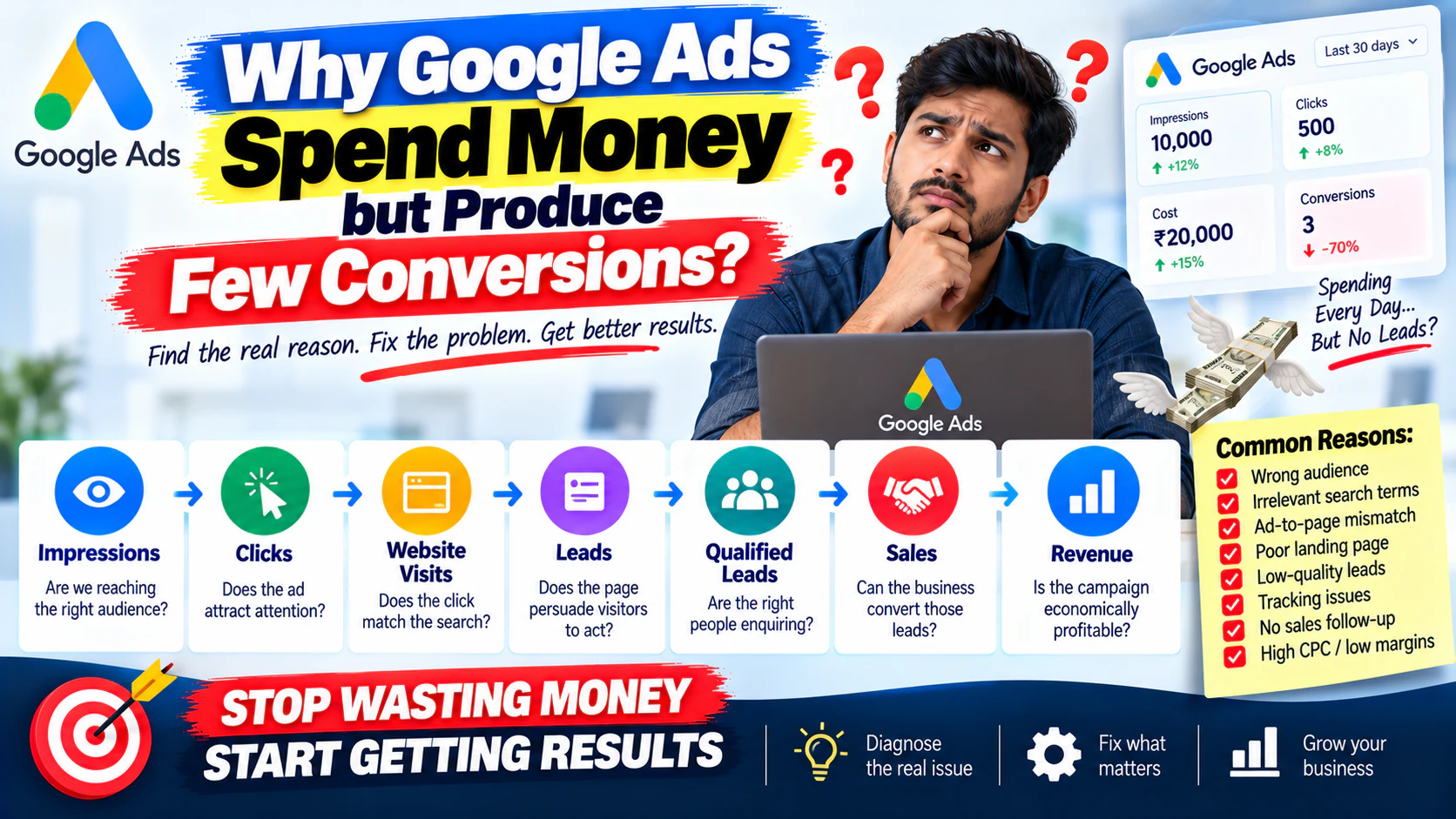
The Google Ads Conversion Chain
Think about your paid campaign as a pipeline:
Each stage answers a different question.
| Stage | Question |
|---|---|
| Impressions | Are we reaching the right audience? |
| Clicks | Does the ad attract attention? |
| Website visits | Does the click match the search? |
| Leads | Does the page persuade visitors to act? |
| Qualified leads | Are the right people enquiring? |
| Sales | Can the business convert those leads? |
| Revenue | Is the campaign economically profitable? |
This distinction matters.
If you have 10,000 impressions and almost no clicks, your problem is probably not the landing page.
If you have 500 clicks and no enquiries, the landing page, offer, traffic quality, or tracking deserves immediate attention.
If you have 50 leads and no sales, stopping Google Ads may be the wrong decision entirely.
The problem may be your sales process.
Your Conversion Tracking May Be Wrong
This is the first thing to check.
Before assuming you have a conversion problem, confirm that Google Ads can actually see your conversions correctly.
You may be receiving:
- Phone calls
- WhatsApp enquiries
- Contact forms
- Demo requests
- Quote requests
- Purchases
…but only some of them may be tracked.
For example:
A visitor submits your form.
The website shows:
But the form submission is not connected correctly to your Google Ads conversion action.
Google Ads records:
even though the business actually received enquiries.
That creates a false diagnosis.
Check:
- Are form submissions tracked?
- Are phone calls tracked?
- Are important button clicks tracked?
- Are duplicate conversions being counted?
- Are old conversion actions still active?
- Are primary and secondary conversions configured correctly?
- Are conversions attributed to the correct campaigns?
- Is the conversion tag firing?
- Are offline sales being imported where appropriate?
Your Campaign May Be Getting the Wrong Clicks
A click is not a customer.
This is one of the most important concepts in Google Ads.
Consider a company selling:
A broad keyword could expose the business to searches such as:
- interior design ideas
- interior design course
- interior design salary
- interior design jobs
- home interior ideas
- interior design images
Those searches can generate traffic.
But most of that traffic has little value to the business.
The campaign is technically getting clicks.
The business is still wasting money.
Ask:
If the answer is no, the traffic needs investigation.
Your Keywords May Be Too Broad
Broad targeting can create a large volume of traffic.
But volume is not the same as intent.
Compare:
with:
The first search could come from someone researching the subject.
The second is much closer to a potential buyer.
That difference affects:
- CPC
- CTR
- conversion rate
- lead quality
- cost per lead
- customer acquisition cost
Your keyword strategy should reflect what the business actually sells, not simply what people search for.
Search Intent May Not Match Your Offer
This is one of the biggest reasons Google Ads spend without producing conversions.
A person can search for something closely related to your product but still have a completely different objective.
For example:
could mean:
- What is Google Ads?
- How does Google Ads work?
- Google Ads tutorial
- Google Ads certification
- Google Ads agency
- Google Ads pricing
These are not the same intent.
If you are advertising an agency service, you probably don't want to pay heavily for users who are simply trying to learn how Google Ads works.
Better approach
Build campaigns around commercial intent.
For example:
- Google Ads agency
- Google Ads management company
- PPC agency for SaaS
- Google Ads services for ecommerce
- PPC management services
The exact keywords depend on the business, but the principle remains:
Your Search Terms Are Telling You the Truth
Your keyword list tells you what you intended to target.
Your search terms tell you what people actually searched.
That distinction is extremely important.
Suppose you target:
Your search terms might include:
- office furniture manufacturers
- office furniture showroom
- used office furniture
- office furniture jobs
- office furniture ideas
- office furniture price
- office furniture online
Some may be valuable.
Others may consume budget without creating business.
This is why search-term analysis should be part of ongoing campaign management.
Look for:
- irrelevant searches
- research queries
- job-related searches
- educational searches
- free/cheap intent
- competitor searches
- unrelated product categories
- consumer searches when you sell B2B
- locations you don't serve
Then decide whether each search term should be:
You May Be Missing Negative Keywords
Negative keywords prevent your ads from showing for searches that are unlikely to produce business.
For example, a paid course provider might not want searches containing:
- free
- jobs
- salary
- internship
- tutorial
- meaning
depending on its offer.
Negative keywords are not about reducing traffic.
They are about reducing traffic that has little business value.
A campaign with 1,000 highly relevant clicks can be more valuable than one with 5,000 mixed-intent clicks.
Your Ad and Landing Page May Be Saying Different Things
Imagine the ad says:
The user clicks.
The landing page says:
That is a mismatch.
The visitor expected a specific offer.
Instead, they landed on a generic page.
The result?
They leave.
Stronger experience:
Ad: Get a Free Website Audit
Landing Page: Free Website Audit for Service Businesses
CTA: Request Your Free Audit
The closer the journey feels to the original search and ad, the less friction you create.
Your Landing Page May Be the Real Problem
You can have:
- relevant keywords
- strong ads
- good CTR
- qualified traffic
…and still get very few conversions.
Why?
Because the landing page doesn't do its job.
Common problems include:
Weak headline
The visitor cannot immediately understand what you offer.
Generic messaging
The page talks about the company instead of the customer's problem.
Too many choices
The user sees:
- 12 navigation links
- multiple services
- social media links
- several CTAs
- unrelated offers
and doesn't know what to do next.
Weak CTA
“Submit” is less compelling than:
when a quote is what the visitor wants.
Lack of trust
There are no:
- case studies
- testimonials
- results
- reviews
- client logos
- guarantees where appropriate
- proof of expertise
Poor mobile experience
The page may work on desktop but be frustrating on mobile.
If paid traffic is landing on a weak page, increasing the ad budget simply sends more expensive traffic into the same broken funnel.
Your Offer May Not Be Strong Enough
Sometimes the traffic and landing page are reasonable.
The offer is the problem.
Imagine two agencies advertising:
Agency A: “Digital Marketing Services”
Agency B: “Get a 30-Minute Growth Audit for Your Business”
The second offer gives the visitor a clearer reason to take action.
Depending on the business, the offer could be:
- Free consultation
- Product demo
- Quote
- Audit
- Trial
- Sample
- Assessment
- Discount
- Strategy session
- Downloadable resource
The right offer depends on the business and buying stage.
But the principle is simple:
Your Ad Copy May Attract Curiosity Instead of Buyers
A high CTR sounds good.
But CTR alone does not pay your bills.
Suppose your ad says:
It might attract curious users.
But an ad such as:
may attract fewer clicks while producing more commercially relevant visitors.
The goal isn't:
The goal is:
Your Campaign Structure May Mix Different Intent
Imagine one campaign contains:
- brand keywords
- generic keywords
- competitor keywords
- high-intent service keywords
- informational searches
These audiences behave differently.
They can have different:
- CPCs
- conversion rates
- lead quality
- budgets
- messaging
- economics
When everything is mixed together, performance becomes harder to understand.
A better structure groups campaigns around meaningful business intent.
For example:
The exact structure should depend on account size and search volume.
Don't create dozens of campaigns simply to make the account look organized.
Your Location Targeting May Be Wrong
This is particularly important for local and service businesses.
Suppose your business serves:
but your campaign is effectively reaching people outside your service area.
You may pay for clicks from:
- other cities
- other states
- other countries
- people searching about your target city but not actually located there
Check:
- campaign location settings
- location reports
- actual user locations
- excluded areas
- presence vs interest settings where relevant
- whether your service can actually be delivered in those locations
For local businesses, geography can make or break lead quality.
Device Performance May Be Different
A campaign can perform very differently across:
- Mobile
- Desktop
- Tablet
Suppose:
| Device | Clicks | Leads | Conversion Rate |
|---|---|---|---|
| Mobile | 700 | 8 | 1.14% |
| Desktop | 250 | 18 | 7.20% |
| Tablet | 50 | 0 | 0% |
The account-level conversion rate hides an important story.
Mobile traffic may not necessarily be bad.
The problem could be:
- slow mobile page
- difficult form
- poor CTA placement
- click-to-call issues
- mobile UX problems
So don't immediately exclude a device.
Your Budget May Be Spread Too Thin
Suppose you have ₹50,000 per month.
Instead of concentrating it on a small number of high-priority campaigns, you divide it across:
- 8 campaigns
- 30 ad groups
- hundreds of keywords
Now each area receives too little data.
You may struggle to identify winners.
A smaller account often benefits from:
The goal is not to make the account look sophisticated.
The goal is to generate enough meaningful data to make good decisions.
Your CPC May Simply Be Too High for Your Economics
This is where advertising becomes a business problem rather than just an advertising problem.
Suppose:
- Average CPC \= ₹300
- Landing-page conversion rate \= 2%
- Cost per lead \= ₹15,000
If only 10% of leads become customers:
If your average gross profit from a customer is ₹50,000, the campaign is not sustainable.
Even if Google Ads is technically optimized.
This is why you need to calculate:
before deciding whether a campaign is viable.
Your Lead Quality May Be the Real Problem
You may say:
But what were those 30 leads?
If they were:
- irrelevant businesses
- people outside your location
- low-budget prospects
- students
- job seekers
- spam submissions
- people looking for free services
then the issue isn't necessarily conversion volume.
It's lead quality.
Track leads through the funnel:
This gives you a much better picture of campaign performance.
Your Sales Team May Be Losing the Leads
This problem is often overlooked.
Suppose Google Ads generates 20 legitimate enquiries.
The sales team:
- calls after 2 days
- misses several calls
- doesn't send follow-up messages
- gives unclear pricing
- doesn't understand the lead source
- doesn't follow a follow-up process
The advertising team may get blamed.
But the campaign actually generated opportunities.
The business failed to convert them.
This is why marketing performance should not stop at:
You should eventually measure:
Your Website May Be Too Slow
Paid visitors have little patience.
If the landing page takes too long to load, especially on mobile, you are paying for visitors who may leave before seeing your offer.
Check:
- mobile speed
- image sizes
- unnecessary scripts
- page layout shifts
- hosting performance
- form loading
- tracking scripts
- third-party integrations
Speed is not just a technical SEO issue.
For paid traffic, it can directly affect conversion efficiency.
Your Form May Be Creating Too Much Friction
Compare these two forms.
Form A
- Name
- Phone
- Company
- Job title
- Company size
- Budget
- Website
- Industry
- Message
- Preferred meeting time
Form B
- Name
- Phone
- Requirement
If the visitor isn't ready to provide ten pieces of information, Form A can reduce conversions.
That doesn't mean shorter forms are always better.
For expensive B2B services, additional qualification fields may be useful.
The right question is:
Your CTA May Not Match the Buying Stage
Not every visitor is ready to:
A person searching for a complex B2B service may need:
- consultation
- audit
- demo
- proposal
- case study
- pricing discussion
The CTA should match the level of commitment the visitor is ready to make.
For example:
Early stage: Download the Guide
Middle stage: See How It Works
High intent: Request a Consultation
The mistake is asking every visitor for the same action.
Your Campaign May Be Optimizing Toward the Wrong Conversion
This is a major account-level issue.
Suppose you care about:
but Google Ads is optimizing toward:
- page views
- button clicks
- low-value form submissions
- time on site
- other secondary actions
The system may find more users likely to perform that action.
But that does not necessarily mean more customers.
Your conversion setup should reflect the business outcome you actually care about.
Don't Judge the Campaign Only by CTR
CTR answers:
It does not answer:
A better performance chain is:
You need to understand the complete chain.
A Simple Diagnostic Framework
When Google Ads spends but doesn't convert, use this sequence.
Check Tracking
Ask:
If yes → fix measurement first.
Check Search Terms
Ask:
If no → fix targeting and negative keywords.
Check Intent
Ask:
If mostly research → refine keyword strategy.
Check Ad Relevance
Ask:
If no → improve messaging.
Check Landing Page
Ask:
If no → fix the landing page.
Check Offer
Ask:
If no → improve the offer.
Check Lead Quality
Ask:
If no → improve targeting and qualification.
Check Sales Follow-Up
Ask:
If no → fix the sales process.
Google Ads Problem → Likely Cause → What to Check
| Problem | Likely Cause | First Check |
|---|---|---|
| Lots of impressions, few clicks | Weak relevance or messaging | Keywords + ads |
| Lots of clicks, no leads | Landing page or traffic quality | Search terms + landing page |
| Cheap leads, poor quality | Broad/low-intent targeting | Search terms |
| Good CTR, poor conversions | Ad-to-page mismatch | Landing page |
| Good leads, few customers | Sales process | Follow-up + close rate |
| No conversions reported | Tracking issue | Conversion setup |
| High CPC, low volume | Competitive keywords | Keyword economics |
| Strong desktop, weak mobile | Mobile UX | Mobile landing page |
| Good traffic, high bounce | Page mismatch or weak experience | Landing page |
| Lots of spend on irrelevant terms | Weak search-term control | Negative keywords |
A Practical Example
Imagine a service business spends:
The campaign generates:
- 300 clicks
- ₹200 average CPC
- 6 leads
- ₹10,000 CPL
The owner wants to stop the campaign.
Before doing that, investigate.
Search terms
You discover 25% of clicks are coming from low-intent searches.
You clean them up.
Landing page
The page has a generic headline and weak CTA.
You create a dedicated service page.
Tracking
Phone calls were not being counted correctly.
You fix call tracking.
Sales
The business was contacting new leads only once.
A structured follow-up process is introduced.
The original ₹60,000 budget wasn't necessarily the problem.
That is why simply increasing or decreasing the budget would not have solved the underlying issue.
What You Should NOT Do When Google Ads Isn't Converting
Avoid these common reactions.
Don't immediately increase the budget
More budget doesn't fix bad traffic.
Don't immediately pause everything
You may destroy useful data before identifying the problem.
Don't change ten things simultaneously
If you change:
- keywords
- ads
- landing page
- bidding
- budget
- targeting
at the same time, you won't know what actually improved performance.
Don't optimize for clicks alone
Clicks are a means, not the final business outcome.
Don't blame Google first
Google Ads can only work with the targeting, offer, website, tracking and sales process around it.
Don't judge the account from one metric
Look at the complete funnel.
The Right Way to Fix a Low-Converting Google Ads Account
Use a controlled process.
Phase 1 — Diagnose
Check:
- conversion tracking
- search terms
- keywords
- locations
- devices
- campaigns
- ad relevance
- landing pages
- lead quality
Phase 2 — Prioritize
Separate problems into:
Critical: Tracking, major irrelevant spend, broken forms
High impact: Search intent, landing page, offer, lead quality
Optimization: Ad variations, bidding adjustments, minor structural improvements
Phase 3 — Fix
Don't make random changes.
Fix the biggest leak first.
Phase 4 — Measure
Give the changes enough time and data to evaluate.
Phase 5 — Scale
Only after the campaign demonstrates acceptable economics should you consider increasing spend.
The Most Important Question: Where Is the Leak?
When Google Ads spends money but produces few conversions, don't ask:
Ask:
“At which stage are qualified prospects dropping out?”
That question changes the entire audit.
Maybe the problem is:
Maybe it is:
Maybe it is:
Maybe it is:
Maybe it is:
Maybe it is:
Until you identify the actual leak, changing the campaign is mostly guesswork.
When Should You Audit Google Ads?
Don't wait until the account has wasted a large budget.
Review performance regularly, especially when:
- spend increases significantly
- conversion rate drops
- CPL rises
- lead quality changes
- a new campaign launches
- landing pages change
- offers change
- tracking changes
- business locations change
- sales performance changes
For a more systematic process, start with a full Google Ads account audit rather than making isolated campaign changes.
Final Checklist
If Google Ads is spending but producing few conversions, check these 12 areas first:
- Conversion tracking
- Search terms
- Negative keywords
- Keyword intent
- Campaign structure
- Ad-to-search relevance
- Landing-page experience
- Offer strength
- Location targeting
- Device performance
- Lead quality
- Sales follow-up
Don't optimize based on assumptions.
That is how you find out whether the problem is Google Ads—or everything around Google Ads.