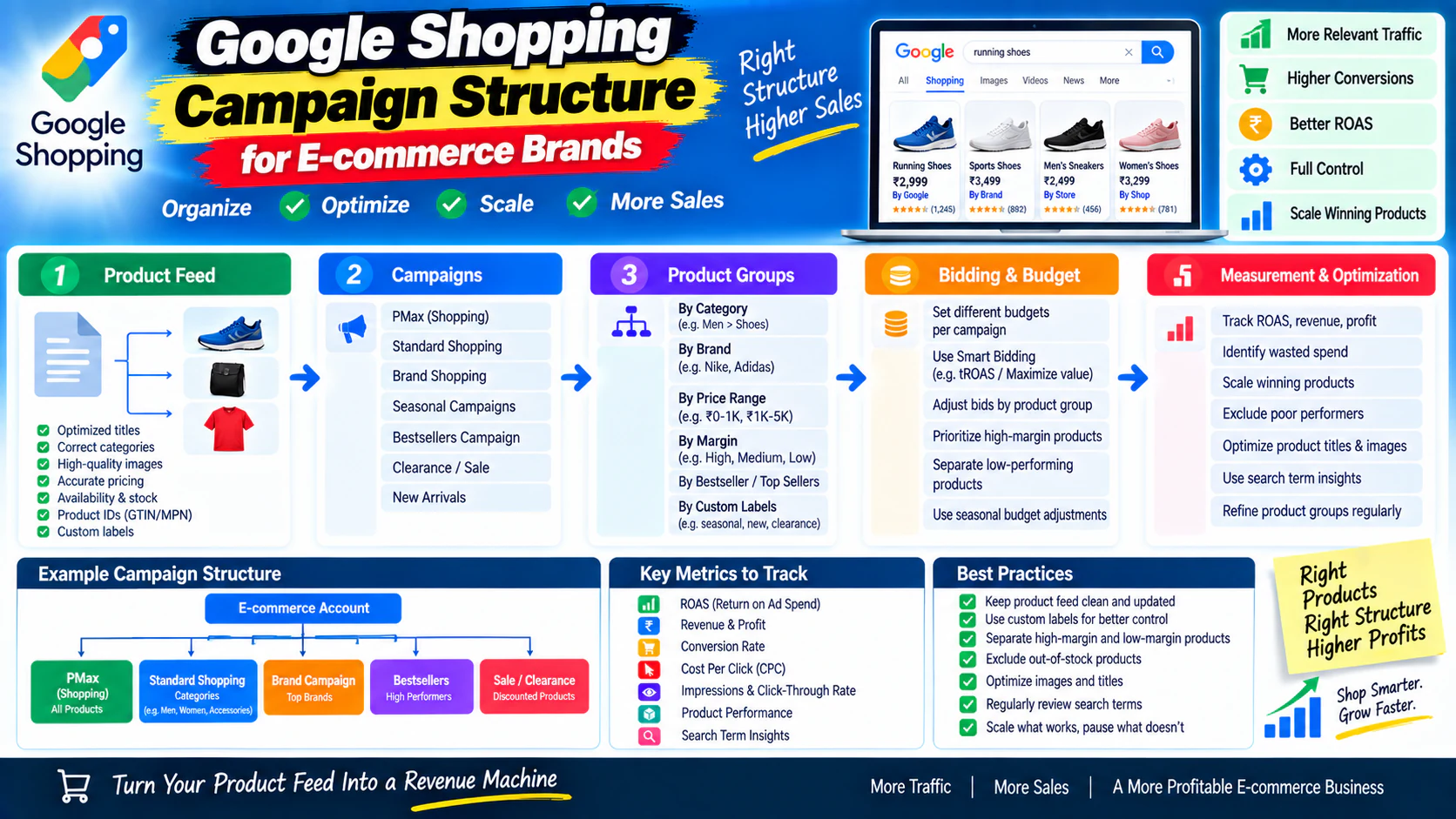
A Google Shopping campaign can have hundreds or thousands of products and still perform poorly.
The problem is often not the number of products.
It is how those products are structured, prioritized, and measured.
Imagine an e-commerce store with:
- 500 products
- 20 categories
- 5 different price ranges
- 3 product margins
- Seasonal products
- Bestsellers
- Slow-moving inventory
- Products with very different conversion rates
If everything is treated equally, Google may receive very little guidance about which products matter most to the business.
That creates a difficult question:
Should your Shopping campaigns be structured around product categories, margins, bestsellers, price ranges, brands, or performance?
The answer is:
A strong Google Shopping campaign structure for e-commerce should make it easier to control budget, prioritize profitable products, identify waste, and scale winning products.
What Is Google Shopping Campaign Structure?
Google Shopping campaign structure is the way an e-commerce advertiser organizes products, campaigns, product groups, budgets, targeting, and bidding so that paid product traffic can be managed efficiently.
A useful structure connects:
The structure should answer questions such as:
- Which products deserve more budget?
- Which products are consuming spend without sales?
- Which categories are most profitable?
- Which products should be scaled?
- Which products need better pricing or landing pages?
- Which products should be excluded?
- Which seasonal products need special treatment?
Why Shopping Structure Is Different From Search Campaign Structure
Traditional Search campaigns are heavily organized around:
- Keywords
- Search intent
- Ad groups
- Ads
Shopping works differently.
Google uses product data from your feed to determine which products can appear for relevant searches.
That means your product data becomes extremely important.
Important feed information can include:
- Product title
- Description
- Product category
- Product type
- Brand
- GTIN where applicable
- Price
- Availability
- Images
- Product identifiers
- Custom labels
So your Shopping strategy is not simply a campaign-setting exercise.
It is also a product-data and merchandising exercise.
The Biggest Shopping Mistake: Treating Every Product Equally
Suppose an e-commerce brand has 1,000 products.
But only 50 products generate 70% of its revenue.
Should those 50 products receive exactly the same treatment as the other 950?
Probably not.
The business may want to:
- Protect budget for proven products
- Test new products separately
- Reduce waste on weak products
- Give seasonal products temporary priority
- Monitor high-margin products differently
This is where campaign structure becomes commercially important.
Start With Product Economics
Before building campaigns, understand your product portfolio.
Create a basic product-performance table:
| Product Group | Revenue | Margin | Conversion | Priority |
|---|---|---|---|---|
| Bestsellers | High | High | High | Very High |
| Bestsellers | High | Low | High | High |
| Mid-volume | Medium | Medium | Medium | Medium |
| Slow movers | Low | High | Low | Test |
| Poor performers | Low | Low | Low | Low |
The exact thresholds depend on the business.
But the principle is simple:
Shopping campaigns should reflect commercial priorities, not just product catalog structure.
Clean Your Product Feed First
Campaign structure cannot compensate for poor product data.
Before launching or restructuring Shopping campaigns, review:
Product titles
Does the title clearly describe the product?
For example:
Weak:
Better:
The goal is not to stuff keywords into the title.
The goal is to make the product understandable and accurately represented.
Product descriptions
Descriptions should provide useful product information and accurately represent what is being sold.
Product categories
Use appropriate product categorization.
A clear category structure helps organize the catalog and supports more useful product segmentation.
Product identifiers
Where applicable, ensure identifiers such as GTIN and brand information are correctly supplied.
Price and availability
Product price and availability need to remain consistent with the actual product page.
A Shopping ad that shows one price while the landing page displays another creates friction and can create feed problems.
Create a Product Taxonomy
Before deciding campaign structure, map the catalog.
For example:
Fashion Store │ ├── Men's Clothing │ ├── T-Shirts │ ├── Shirts │ ├── Jeans │ └── Jackets │ ├── Women's Clothing │ ├── Dresses │ ├── Tops │ ├── Jeans │ └── Jackets │ └── Accessories ├── Bags ├── Belts ├── Wallets └── Watches
This is the merchandising structure.
Your advertising structure can then selectively use this hierarchy where it creates useful control.
Identify Your Product Segments
Don't automatically create one campaign for every category.
Instead, identify commercially meaningful segments.
Common segmentation options include:
Product category
- Shoes
- Bags
- Watches
Brand
- Brand A
- Brand B
- Brand C
Margin
- High margin
- Medium margin
- Low margin
Performance
- Bestsellers
- Proven products
- New products
- Poor performers
Price
- Under ₹1,000
- ₹1,000–₹2,500
- ₹2,500+
Seasonality
- Summer
- Winter
- Festival
- Wedding
- Holiday
Business priority
- Hero products
- Strategic products
- Clearance
- New launches
The best segmentation is the one that gives the business useful control.
Decide What Deserves Its Own Campaign
This is where many e-commerce advertisers overcomplicate the account.
Don't separate products simply because they belong to different categories.
Separate them when you need different control.
For example:
Campaign A — Bestselling Products
Purpose:
Protect and scale proven products.
Campaign B — New Products
Purpose:
Test products with limited performance history.
Campaign C — Clearance / Low Priority
Purpose:
Control spend on products that need a different commercial strategy.
This structure can be more useful than:
- Campaign: Shoes
- Campaign: Shirts
- Campaign: Bags
- Campaign: Watches
- Campaign: Belts
- Campaign: Wallets
The category structure may still be useful inside campaigns.
But it does not automatically justify separate campaigns.
A Practical Shopping Campaign Structure
For a medium-sized e-commerce brand, a simplified structure could look like:
Google Shopping Account │ ├── Campaign 1: Bestsellers │ ├── Product Group: Category A │ ├── Product Group: Category B │ └── Product Group: Category C │ ├── Campaign 2: New Products │ ├── Product Group: Category A │ ├── Product Group: Category B │ └── Product Group: Category C │ └── Campaign 3: Other Products ├── Product Group: Category A ├── Product Group: Category B └── Product Group: Category C
This is only a framework.
A large catalog with multiple brands, margins, locations, or commercial priorities may require a different structure.
Standard Shopping vs Performance Max
When discussing Google Shopping today, it is important to distinguish between campaign types.
Google offers multiple ways for advertisers to promote products, including Shopping campaigns and Performance Max.
Performance Max can use product feed information and distribute ads across multiple Google inventory surfaces.
That means the structure you choose should depend partly on the campaign type and the level of control you need.
For an e-commerce strategy, the bigger question remains:
How do we segment and prioritize the products inside the advertising system?
Product Groups: The Core Building Block
Product groups allow you to subdivide the products included in a Shopping campaign.
You can organize products using attributes such as:
- Product type
- Brand
- Category
- Item ID
- Condition
- Custom labels
This is where the product catalog becomes an advertising structure.
For example:
All Products │ └── Product Type │ ├── Running Shoes ├── Casual Shoes └── Formal Shoes
You can then make further subdivisions where useful.
Use Custom Labels for Business Logic
One of the most powerful ideas in e-commerce Shopping structure is using custom labels to communicate business information that isn't adequately represented by standard product attributes.
For example:
Custom Label 0 — Margin
- High Margin
- Medium Margin
- Low Margin
Custom Label 1 — Performance
- Bestseller
- Standard
- New
- Poor Performer
Custom Label 2 — Season
- Summer
- Winter
- Festival
Custom Label 3 — Price Tier
- Entry
- Mid
- Premium
Custom Label 4 — Business Priority
- Hero
- Strategic
- Clearance
This lets the advertising structure reflect business logic.
Example: Using Margin-Based Segmentation
Imagine three products:
| Product | Selling Price | Gross Margin | Conversion Rate |
|---|---|---|---|
| Product A | ₹2,000 | 60% | 4.5% |
| Product B | ₹3,500 | 25% | 5.0% |
| Product C | ₹1,500 | 55% | 1.2% |
Product B may generate more revenue per sale.
But Product A may contribute more profit.
This is why optimizing purely around revenue can be misleading.
For an e-commerce advertiser, the important question is often:
What happens after the sale?
If your business can reliably pass useful value signals back into advertising systems, optimization can become more aligned with commercial outcomes.
Revenue Is Not the Same as Profit
This deserves special attention.
Suppose:
Product A
Revenue: ₹10,00,000
Gross profit: ₹2,00,000
Product B
Revenue: ₹7,00,000
Gross profit: ₹3,00,000
If you optimize only for revenue, Product A looks stronger.
If you optimize for profit contribution, Product B may be more attractive.
This is why e-commerce PPC structure should eventually connect advertising data with product economics.
Separate Bestsellers From Experimental Products
New products and proven products have different levels of uncertainty.
A bestseller has:
- Existing conversion history
- Known demand
- Proven product-market fit
- Existing sales data
A new product has:
- Limited history
- Unknown demand
- Uncertain conversion rate
- Less evidence
Putting them into the same bucket can make performance analysis difficult.
A dedicated testing structure can help you answer:
“Are these products failing because demand is weak, or because we have not collected enough evidence yet?”
Protect Budget for High-Value Products
Suppose your catalog contains 500 products.
Only 30 products generate consistent profitable sales.
You may not want the entire catalog competing for the same budget without any prioritization.
A better strategy can be:
This creates a more deliberate budget allocation model.
Don't Let Product Groups Become Too Granular
A common mistake is creating an enormous hierarchy:
Category → Brand → Product Type → Price → Color → Size → SKU
This can create an account that looks sophisticated but is almost impossible to manage.
Every subdivision should answer:
What decision will I make differently because this product group is separate?
If the answer is nothing, don't create the split.
Build Around Business Questions
Instead of asking:
Ask:
Question 1
Which products deserve more budget?
Question 2
Which products waste spend?
Question 3
Which categories generate profitable sales?
Question 4
Which products need better landing pages?
Question 5
Which products are seasonal?
Question 6
Which products are new and need testing?
Question 7
Which products have strong conversion rates but insufficient traffic?
Your campaign structure should help answer these questions.
Use Search-Term Data to Find Demand Patterns
Shopping campaigns can reveal valuable information about what customers are actually searching for.
Suppose you sell running shoes.
You may discover searches around:
- men's running shoes
- running shoes for flat feet
- lightweight running shoes
- running shoes for beginners
- trail running shoes
- branded running shoes
These searches tell you more than product-level performance alone.
They reveal:
This information can influence:
- Product titles
- Product descriptions
- Landing pages
- Product categories
- SEO content
- Future campaign structure
Shopping Campaigns Still Need Landing-Page Relevance
A product ad can get the click.
The product page has to close the sale.
Imagine a user clicks an ad for:
But the landing page:
- Loads slowly
- Has unclear sizing
- Doesn't show delivery information
- Has poor product photography
- Hides reviews
- Makes returns difficult to understand
The problem is no longer just advertising.
It is the e-commerce conversion experience.
This is why Shopping performance should always be evaluated alongside product-page and checkout performance.
Product Page Elements That Matter
For paid Shopping traffic, review:
Product title
Is it immediately clear what the product is?
Product images
Can the customer understand the product visually?
Price
Is the price clear and consistent?
Availability
Can the customer tell whether it is in stock?
Variants
Are size, color, quantity, or other options easy to select?
Reviews
Is social proof visible?
Delivery
Can the customer understand shipping expectations?
Returns
Are return conditions easy to find?
CTA
Is the purchase action obvious?
Don't Blame Google Ads for Every E-commerce Problem
Suppose:
- Shopping clicks are strong
- Product views are strong
- Add-to-cart rate is weak
That could indicate a product-page problem.
If:
- Add-to-cart is strong
- Checkout starts are strong
- Purchases are weak
The problem may be deeper in the checkout experience.
If:
- Purchases happen
- Revenue is strong
- Profitability is weak
The problem may be product economics rather than traffic.
This is why an e-commerce advertising audit should examine the complete journey.
A Useful E-commerce Diagnostic Funnel
Track:
When performance drops, identify where the drop occurs.
Don't simply say:
“Shopping isn't working.”
Find the stage where the system is breaking.
How Budget Should Influence Structure
Suppose an e-commerce business has ₹3,00,000/month available.
A possible strategic allocation might be:
| Product Segment | Budget Priority |
|---|---|
| Proven high-value products | Highest |
| Proven standard products | High |
| New products | Controlled |
| Low performers | Limited |
| Experiments | Limited |
These percentages should not be copied blindly.
Actual allocation should depend on:
- Margin
- Conversion rate
- Demand
- Inventory
- Average order value
- Customer lifetime value
- Business priorities
What About High-AOV Products?
Products with high average order values can behave differently from low-ticket products.
For example:
versus
The acceptable acquisition economics may be completely different.
A campaign structure that makes sense for a ₹799 product may not make sense for a ₹25,000 product.
For high-AOV products, consider:
- Longer consideration cycles
- Lower purchase volume
- Higher acceptable CPA
- Higher-value conversions
- Potential assisted conversions
The economics should influence the strategy.
How Seasonality Should Affect Shopping Structure
E-commerce demand is rarely static.
Some products perform strongly during:
- Diwali
- Christmas
- Valentine's Day
- Wedding season
- Summer
- Winter
- Back-to-school periods
If a product is strategically important during a specific period, its campaign treatment may need to change.
But don't create permanent campaigns for every seasonal event.
Use separate structures when the season represents a meaningful budget or optimization decision.
New Product Launch Framework
For a new product:
Before launch
Check:
- Product feed quality
- Product page
- Price
- Images
- Inventory
- Tracking
Initial test
Give the product controlled exposure.
After data collection
Evaluate:
- Click-through behavior
- Product engagement
- Add-to-cart rate
- Conversion rate
- CPA
- ROAS
- Profitability
Then decide
This is more disciplined than judging a product after a handful of clicks.
Shopping Optimization: What Should You Actually Change?
When performance is weak, investigate in this order.
Product eligibility and feed
Are products properly represented?
Product demand
Do people actually want these products?
Pricing
Is the offer competitive?
Product page
Does the page convert?
Campaign structure
Are high-value products getting enough control?
Search behavior
Are actual searches relevant?
Bidding and budget
Is the campaign constrained or inefficient?
Business economics
Can the products support the acquisition cost?
This prevents random optimization.
A Practical Google Shopping Structure by Business Type
Small E-commerce Store
If you have a small catalog:
Campaign │ ├── High-Priority Products └── Other Products
Keep it simple.
Growing E-commerce Store
Campaign │ ├── Bestsellers ├── New Products └── Other Products
Then subdivide product groups by meaningful categories.
Large E-commerce Store
A larger account may need segmentation around:
- Product categories
- Brands
- Margin
- Performance
- Inventory
- Seasonality
- Business priority
But complexity should be earned by scale.
The “Separate Campaign or Product Group?” Test
Use this simple rule.
Use a separate campaign when:
- Budget needs to be controlled separately
- Bidding strategy needs to differ
- Business priority is different
- Performance needs separate reporting
- Geography differs
- Inventory strategy differs materially
Use a product group when:
- You only need reporting/organization
- Products can share the same campaign-level strategy
- No separate budget is necessary
- No meaningful bidding distinction is required
Don't split when:
- There is no business decision behind the split
- Traffic is too low
- The structure becomes difficult to manage
- Products behave similarly
10 Signs Your Shopping Structure Needs Improvement
You don't know which products consume the most spend.
Bestselling products are mixed with weak products without a clear strategy.
New products cannot be evaluated separately.
High-margin products receive no special consideration.
Your feed contains inconsistent product information.
Search queries reveal irrelevant traffic repeatedly.
Product pages have poor conversion rates.
Budget cannot be moved intelligently between product segments.
You optimize toward revenue while ignoring product economics.
You keep adding product groups without knowing why.
Google Shopping Campaign Structure Checklist
Before launching or restructuring:
Product Feed
- Product titles are clear.
- Descriptions are accurate.
- Categories are organized.
- Brand information is correct.
- Product identifiers are supplied where applicable.
- Prices are accurate.
- Availability is accurate.
- Images represent the actual product.
Business Strategy
- Bestselling products are identified.
- High-margin products are identified.
- New products are identified.
- Poor performers are identified.
- Seasonal products are identified.
- Inventory priorities are understood.
Campaign Structure
- Campaigns have a clear purpose.
- Budgets reflect business priorities.
- Product groups are meaningful.
- Custom labels are used where useful.
- The account is not unnecessarily over-segmented.
Conversion
- Purchase tracking is working.
- Revenue values are accurate.
- Product pages are conversion-ready.
- Checkout works properly.
- Business profitability is considered.